Profiles (/admin/roles) are permission packs assigned to users. The UI label is Profiles; data maps to legacy roles (PerfilController / rol).
Permissions: FunctionId ROL (2), menu Identity → Profiles (function.url = rol). View opens the list; Add controls Add profile; Edit opens the wizard; Delete controls row and bulk delete.
Screen layout
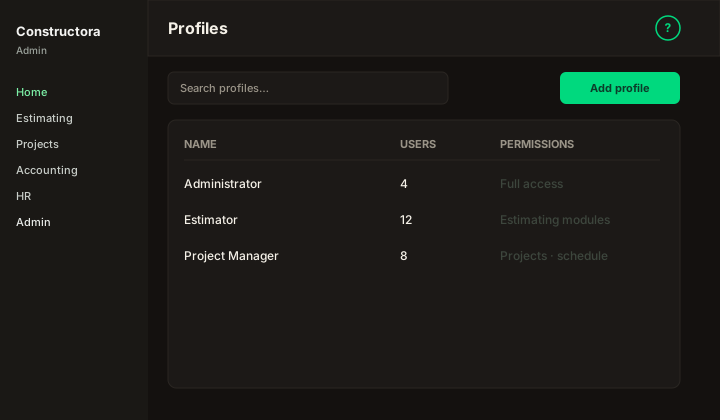
Figure: Profiles list — Search profiles…, Add profile, columns Name, Users, Permissions, row ⋮, pagination.
| Region | What you see |
|---|---|
| Page toolbar | Title Profiles, subtitle, Add profile, ? help. |
| Data card | Search, sortable columns, row ⋮, bulk Delete when permitted, pagination. |
| Full-page wizard | /admin/roles/new · /admin/roles/\{id\} — Basics, Permissions, Widgets. |
List columns
| Column | Meaning |
|---|---|
| Name | Profile label shown on the Users form. |
| Users | One assigned user plus See more — name opens that user; See more lists name + email for everyone on the profile. |
| Permissions | Summary of function grants used across Constructora modules. |
Editing a profile affects every user who holds it on their next authorized action (users can still override per-user permissions in the Users wizard).
Profile wizard
| Step | What you configure |
|---|---|
| Basics | Profile Name (required). |
| Permissions | Grouped like the Admin sidebar; search to filter; View / Add / Edit / Delete / All per function. Copied to users when assigned or when Profile changes on a user. |
| Widgets | Dashboard card grid — default rol_widget_access for new users on this profile. |
Cancel with unsaved changes: Save and close, Discard and close, or stay. Row or bulk Delete always confirms first.