Notifications (/admin/notifications) is the Admin inbox. Unread items also appear in the header bell feed.
Permissions: FunctionId NOTIFICATION (12), route /admin/notifications (function.url = notification). Sidebar label may read Announcements depending on locale. View opens the page and bell feed; Edit controls mark-read actions; Delete controls row and bulk delete.
Screen layout
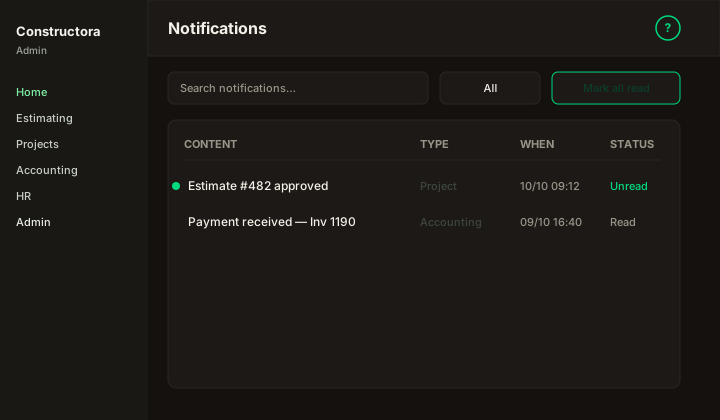
Figure: Inbox — Search notifications…, status filter, Mark all read, columns Content, Type, When, Status, row ⋮.
| Region | What you see |
|---|---|
| Page toolbar | Title Notifications, subtitle, ? help. Header bell opens the same feed when you have View. |
| Data card | Search, filters (status / date when available), Mark all read, sortable columns, checkboxes, bulk Delete, pagination. |
| Row actions | Mark read (when Edit allowed) · Delete (confirm, then hard-delete). |
List behavior
| Column | Meaning |
|---|---|
| Content | Message body shown to the operator. |
| Type | Notification category. |
| When | Created timestamp. |
| Status | Read / Unread — unread rows drive the header badge count. |
- Mark all read — clears unread state for the inbox and header badge (Edit permission).
- Delete — confirmation dialog, then hard-delete (legacy
eliminarNotification/eliminarNotifications).
Due-date reminders
The HTTP job GET /definir-notificaciones-duedate creates inbox rows of type due_date_reminder for users in roles 3 and 4, about 10 and 5 days before the monthly day-of-month of a project dueDate (completed projects are skipped). The same content is not sent twice. Each aviso also emails invoice-due-date-reminder. The Content column shows copy like CG-1 - Bridge invoice due date 03/09/2026 (in 5 days).