Reminders (/admin/reminders) is the maintainer behind FunctionId REMINDER (23). The page title is Reminders and the breadcrumb is Manage Reminders. The header + Add Reminder control still creates an Active reminder from any admin screen.
Permissions: menu Admin → Reminders (function.url = reminder). View opens the list; Add controls New and the header button; Edit and Delete control row actions and bulk delete.
Screen layout
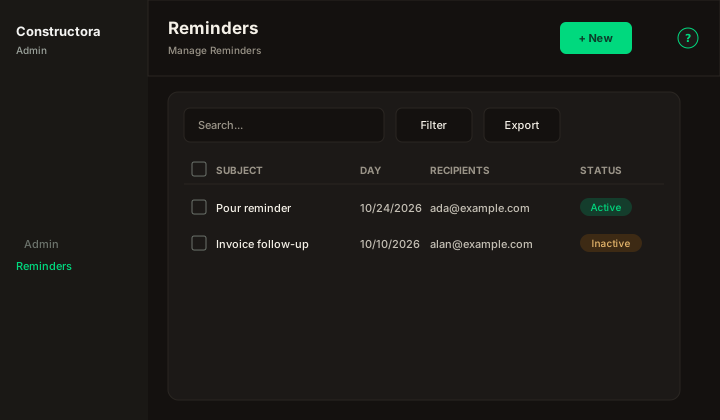
Figure: FoodHub list — New, Search..., Filter, Export, sortable Subject, Day, and Status, Recipients, row ⋮, and pagination.
Default sort: Day descending.
List behavior
- Search matches Subject or Content when the term is empty or at least 3 characters.
- Filter options uses From and To on the reminder date (
day). - Recipients show as email addresses. That column is not sortable.
- Export covers the current page.
- Status is Active or Inactive.
Modal
- New Reminder: — Recipients, Subject, Content, and Date are required. Status starts Active.
- Update Reminder:
`{subject}`— same fields. Recipients are replaced on save. - An empty subject, date, or recipient list shows This field is required.
- An empty body shows The body of the reminder cannot be empty.
- Save toast: The operation was successful. The API writes an ApplicationLog in category Reminder.
The header dialog uses the same required fields without a Status switch (always Active).
Delete
Delete removes the reminder and its recipients. Bulk delete that removes nothing shows The reminders could not be deleted, because they are associated with a invoice. A partial bulk delete shows The operation was successful. But attention, it was not possible to delete all the selected reminders because they are associated with a invoice.
Active reminders are emailed on that date by the HTTP job GET /cron-reminders (calendar date in America/New_York). The job does not mark them sent, so a second run the same day sends again. Inactive rows are skipped.
Related
- Application logs
- Manage users — pick recipients