The Users maintainer (/admin/users) is the directory of Admin operators. Filters, columns, and form fields match the legacy Symfony UsuarioController / Usuario*Request DTOs.
Permissions: FunctionId USUARIO (3), menu Identity → Users (function.url = users). View opens the list; Add controls Add user; Edit controls the wizard and Activate/Deactivate; Delete controls row and bulk delete (hard-delete, ADR-030).
Screen layout
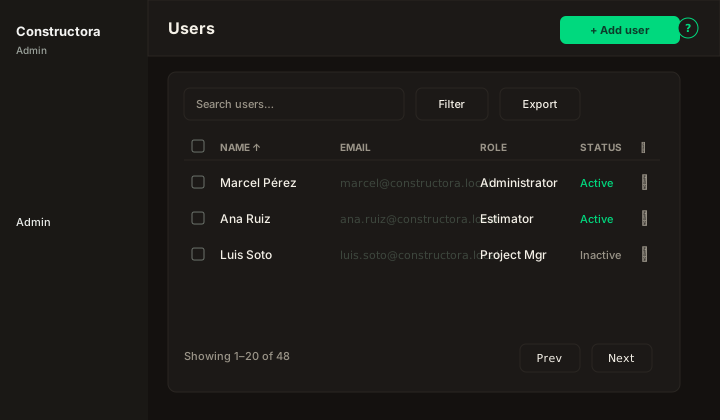
Figure: FoodHub list — Search users…, Filter (profile/role, status), Export, sortable Name / Email / Role / Status, checkboxes, bulk bar, row ⋮, pagination.
| Region | What you see |
|---|---|
| Page toolbar | Title Users, subtitle, Add user (Add) on the right, ? help. |
| Data card | Search, Filter, Export, column headers, checkboxes, bulk Deactivate and Delete, mobile cards, pagination. |
| Full-page wizard | /admin/users/new and /admin/users/\{id\} — sticky Cancel · Back · Next · Save; steps Basics, Permissions, Widgets. |
Default sort: Name ascending.
List behavior
- Search — matches Name and Email (debounced).
- Filter — Profile (role) and Status (Active/Inactive) — legacy parity.
- Export — Copy / CSV for the current page.
- Checkboxes + bulk bar — Deactivate when selection includes active users (confirms first). Delete confirms then hard-deletes. Bulk Activate is not in the bulk bar (FoodHub).
- Row ⋮ — Edit (wizard) · Activate or Deactivate (one action, based on row status) · Delete.
Activate/Deactivate toggles status only (activarUsuario); it does not remove data. Delete runs EliminarInformacionDeUsuario and cannot be undone.
User wizard
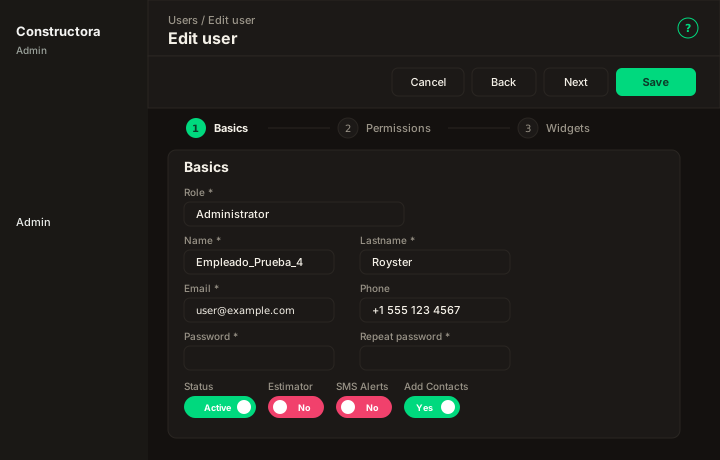
Figure: Create/Edit user — stepper Basics · Permissions · Widgets.
| Step | What you configure |
|---|---|
| Basics | Profile (role), Name, Last name, Email, Phone, Password / Repeat (required on create; blank on edit keeps current), Status, and Yes/No flags: Estimator, Final Qty Approver, SMS Alerts, Bond, Retainage, Chat app, Add Contacts. Changing Profile immediately reloads that role’s permission matrix and widget switches (legacy cambiarPerfil). |
| Permissions | Searchable accordion grouped like the Admin sidebar — View / Add / Edit / Delete / All per FunctionId. Controls sidebar leaves and every Add/Edit/Delete CTA. |
| Widgets | Flat grid of dashboard cards (title, description, switch) — writes user_widget_access (admin assignment). |
Cancel with unsaved changes: Save and close, Discard and close, or stay. Save on edit can persist without leaving the step.