Home (/admin) is the dashboard behind FunctionId HOME (1). The breadcrumb is Home / Dashboard. Cards appear only when an administrator assigned the widget and you left it visible in My Widgets (a missing preference counts as visible). Global hidden codes never show: invoice_profit_share, job_cost_breakdown.
Screen layout
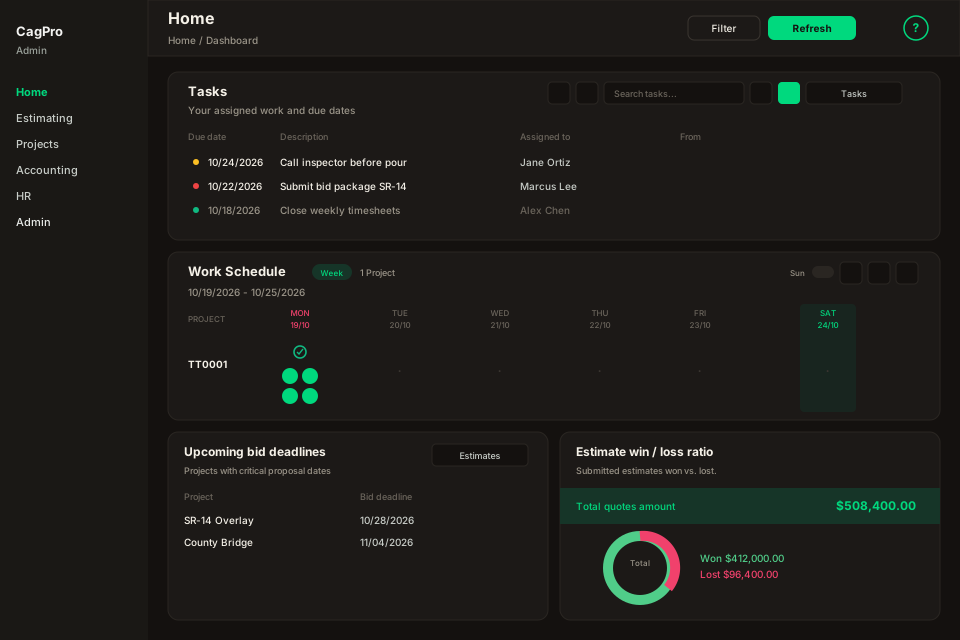
Figure: Home — toolbar Filter and Refresh, full-width Tasks and Work Schedule, then estimate and job-cost cards in pairs on a two-column grid.
| Region | What you see |
|---|---|
| Page toolbar | Title Home, breadcrumb Dashboard, Filter, Refresh (with optional auto-refresh), and the ? icon. |
| Empty state | No dashboard widgets to show plus the explanation about permissions. Filter is hidden when there are no cards. |
| Tasks | Full width. Toolbar order matches origin: Export, Filter, Search, due-date thresholds, New, then the Tasks link. Pending tasks stay listed even when the due date is outside the selected month. |
| Work Schedule | Full width. Title row is Work Schedule + Week badge + project count; week navigation underneath. Right actions: Sun, Export, Filter, Go to Schedule (arrow). A day with work shows a green check plus chips for work, vendor/hours, lead, and location (opens Schedule). Empty days show a muted dot; today is highlighted. Click a day header to open that day’s job list. |
| Other cards | Export then Filter then the module link. Profit & Cost and Measurements also show the current period label before Export. Project Breakdown, Profit & Cost, Measurements, and Project pipeline (estimates) are full width. Project Breakdown groups by project; expand a row for dates, lead, and items. Date opens Data Tracking on General, items on Items, lead on Labor, concrete on Conc. vendors. Profit & Cost has three blocks (job costs donut, gross profit donut, payments bar) plus a projects table. Measurements is a map plus Crew: color dot filters the map, chevron expands Date / Project / County. Project pipeline (estimates) is the 27-month Gantt (12 months of work done plus booked work ahead). HOME Edit can save the monthly target or use the invoiced average. Show schedule lists projects and estimates; click a project name to simulate it dropping out. |
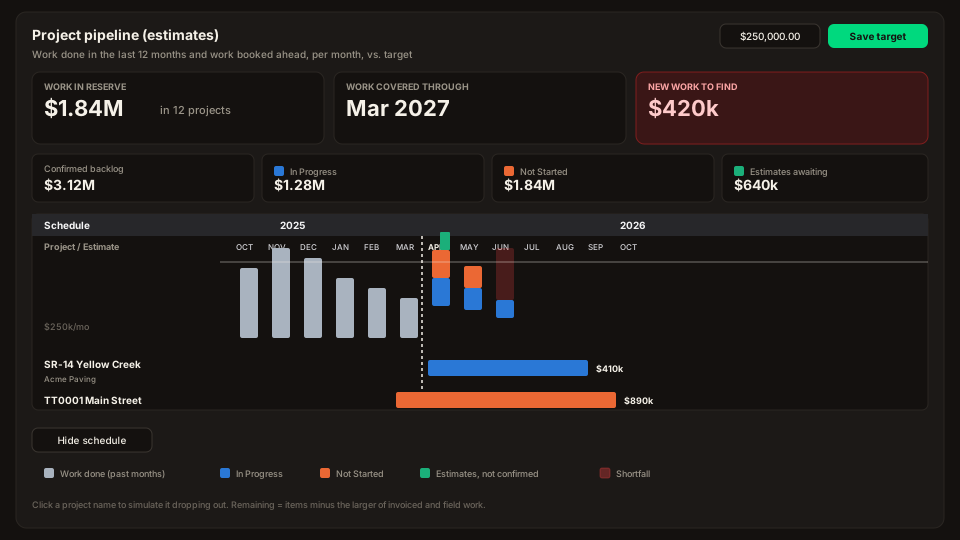
Figure: Project pipeline (estimates) — answers (work in reserve / covered through / new work), KPIs, gray history bars for the last 12 months, stacked In Progress / Not Started / Estimates ahead of today, and Show schedule Gantt rows.
Default period is Current Month. Work Schedule uses the current (or next) week instead.
Global Filter
Period is All Time, Current Month, Last Month, or Custom. Project, From, and To apply to every card except Work Schedule’s week navigation. Apply refreshes the grid. Reset returns to Current Month.
Per-card Filter and Export
Each card repeats Period and From/To, except Work Schedule: Quick select is This Week, Last Week, or Last 2 Weeks (Last 2 Weeks shows 14 day columns). From/To and Project still apply; Apply reloads that range. Project is omitted on Tasks. Tasks also has Assignee. Pay item totals has Status (All / Active / Inactive). Export to Excel downloads the current card with its local filters.
Visibility
Home shows a widget only when user_widget_access is enabled and user_preference_widget is visible. Turn cards on or off in My Widgets without changing the admin assignment.
Related
- My Widgets — which assigned cards appear here.
- Manage tasks — the full Tasks module.