Tasks tracks personal work items: Description, optional Due date, Assigned user, and Pending / Complete status. The same records appear in the full maintainer and in the right-edge drawer.
Permissions: FunctionId TASKS (40), menu Identity → Tasks (function.url = tasks). View opens /admin/tasks and the drawer; Add controls New and drawer +; Edit controls edit, status toggle, and drawer gear; Delete controls row and bulk delete. The drawer uses HOME View for open/read (legacy widget), not TASKS View alone.
Screen layout — maintainer
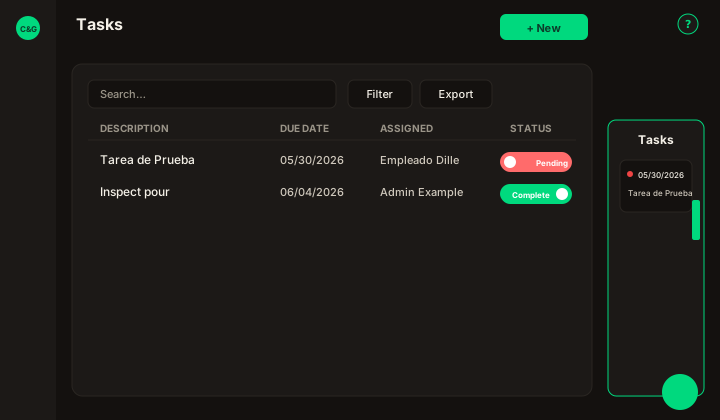
Figure: /admin/tasks — New in page header, Search tasks…, Filter, Export, columns Description, Due date, Assigned, Status, Created.
| Region | What you see |
|---|---|
| Page toolbar | Title Tasks, New (Add), ? help. |
| Data card | Search, Filter (assigned user, status, date presets All / Today / Last 7 / Last 30 / Custom + From–To), Export, in-place Status switch, row ⋮, bulk Delete, pagination. |
| Modal | Cancel / Save in header — Assigned and Description required; Due date uses the same date picker as filters. |
Status on a row toggles Pending ↔ Complete with confirmation. Row ⋮ — Edit · Delete.
Side drawer
| Element | Behavior |
|---|---|
| Edge tab | Slim tab on the right; tooltip on hover; click expands the drawer (current month). |
| Task cards | Traffic-light due date, status switch, description, Assigned to. |
| Gear | Due-date thresholds (yellow / red day counts) — HOME preferences. Those red days also drive the urgency email. |
| Plus | Creates a Pending task quickly. |
Emails
Creating a task (or changing Assigned) sends New task assigned to you to the assignee. The HTTP job GET /cron-task-urgency sends Task due soon — action required once when a pending task enters that user's red window. Completing the task or moving it out of red clears the tracking so a later red window can email again.
Support chat
The circular Support / Chat button (bottom right) opens Tawk.to. Color follows admin accent (Appearance). Independent from Tasks.