Advertisements (/admin/announcements) is the admin list behind the sidebar label Announcements. The page title is Advertisements and the breadcrumb is Manage Advertisements.
Permissions: FunctionId ADVERTISEMENT (17), menu Admin → Announcements (function.url = advertisement). View opens the page; Add controls New; Edit and Delete control row actions and bulk delete.
Screen layout
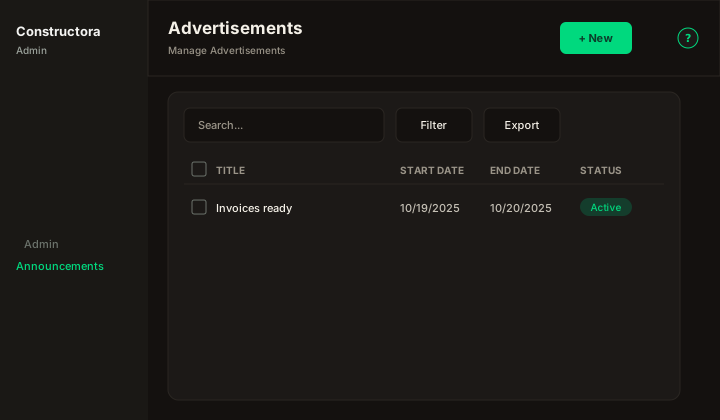
Figure: FoodHub list — New, Search..., Filter, Export, sortable Title, Start Date, End Date, and Status, row ⋮, and pagination.
Default sort: Start Date descending.
How people see them
Active advertisements whose dates include today also appear outside this list:
- The notification bell gains an Advertisements tab. Each row shows the title and the description as plain text, cut at 150 characters. Choosing a row opens a dialog with the title and the full description. View All returns to this list.
- The first of those rows (newest start date) opens once per day for the signed-in user. That dialog stays until Close. It does not close with Escape or a click outside.
List behavior
- Search matches Title or Description when the term is empty or at least 3 characters.
- Filter options uses From and To. A row is included when its date range overlaps that window.
- Export covers the current page.
- Status is Active or Inactive.
Modal
- New Advertisement: — Title, Description, Start Date, and End Date are required. Description uses a text editor (placeholder
Type your text here...). Dates use Select a date. Status starts Active. - Update advertisement:
`{title}`— same fields. - An empty title or date shows This field is required.
- An empty description shows The description of the advertisement cannot be empty.
- A repeated title shows The advertisement title is in use, please try entering another one.
- Save toast: The operation was successful. The API writes an ApplicationLog in category Advertisement.
Delete
Delete removes the advertisement. Bulk delete that removes nothing shows The advertisements could not be deleted, because they are associated with a project. A partial bulk delete shows The operation was successful. But attention, it was not possible to delete all the selected advertisements because they are associated with a project.