My profile (/admin/profile) lets signed-in users update personal data, crop a profile photo, change password, and set sidebar/accent colors — without opening the Users maintainer.
Permissions: No FunctionId — any authenticated admin session. Only your own record is editable here (self-service /admin/me APIs).
Screen layout
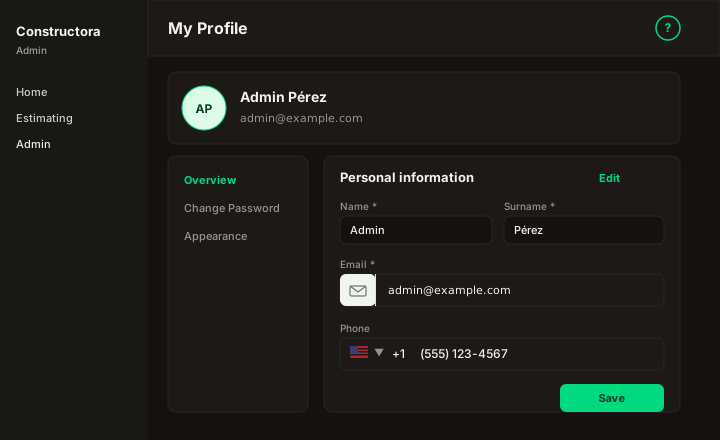
Figure: Avatar menu → My Profile — tabs/sections for personal info, photo, password, and appearance.
| Region | What you see |
|---|---|
| Personal information | Name, Surname, Email, Phone, Save. Email input group with mail icon; Phone with US flag +1 and formatted national number. Email must be unique. |
| Profile photo | Circular avatar — upload, crop/zoom dialog (Apply), remove control. |
| Change password | Current password + new password (FoodHub policy: length, upper/lower, number, special). |
| Appearance | Theme (Original or accent-matched) sets accent, sidebar, and header together; Customize colors for a single override (swatches or hex). Logo/favicon stay brand-fixed. Light/dark mode remains in the header palette (links here for colors). |
Related
- Manage users — administrators edit other users on
/admin/users