Accounts Receivable → Reports opens WIP Report. The page title is the report name; the header shows Home / Reports and the cutoff As of date. Report guide (and the ? icon) open this article.
Use Search to narrow loaded jobs by job number, project name, or owner. Click a column header (or Sort by on mobile) to order the list. The footer paginates like other admin tables (rows per page is remembered); the TOTALS row follows the filtered set, not only the current page. Filter → Apply refreshes the report from the server. Export to Excel / PDF use the Filter values and show a full-screen progress dialog (Generating Excel… / Generating PDF…, then Preparing download…), the same overlay used when generating an invoice file.
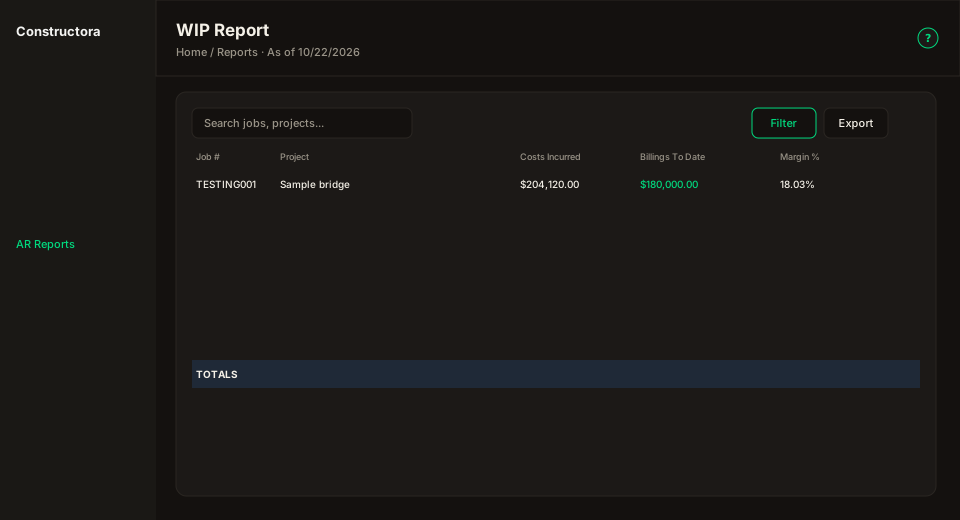
Figure: FoodHub list — title WIP Report, As of in the header, Search, Filter, Report guide, Export; 14 WIP columns plus TOTALS; pagination.
What the report measures
Three figures per job. The gap between the last two is the point of the report.
A WIP report does not compare expenses against income. It compares three figures for each job, and the relationship between the last two is what the report aims to show.
| Figure | Meaning | |
|---|---|---|
| Spent | Costs incurred | Cost committed to the job to date: labor, concrete, materials, subcontracts. |
| Earned | Earned revenue | Revenue earned in proportion to progress. A job 67% complete has earned 67% of its contract. |
| Billed | Billings to date | Amounts actually invoiced to the customer. |
Earned revenue of $102,175 against billings of $110,858. The job has billed $8,683 ahead of the work performed. That difference is the over billing, and it is the basis for the billing adjustment at period close.
Every other column exists to arrive at those three figures.
Where each column comes from
Each column is either an input the system provides, or a figure the report works out from the other columns. The 14 report columns, in the order they appear:
| Column | What it is | How it is derived | Source | |
|---|---|---|---|---|
| A | Job # | Job number. | Project record. | Input |
| B | Project Name | Job description. | Project record. | Input |
| C | Owner / Obligee | Contracting customer. | Company assigned to the project. | Input (hidden in the Excel template) |
| D | Original Contract | Contract as awarded. | Sum of the project's regular pay items (quantity × price). | Input |
| E | Approved Change Orders | Scope added after award. | Sum of pay items classified as change order or add-on. | Input (hidden in the Excel template) |
| F | Revised Contract | Contract as it currently stands. | D + E | Calculated |
| G | Total Costs Incurred | Cost committed through the cutoff date. | Daily field reports: labor + overhead + concrete + materials + subcontracts + abnormal loss. | Input |
| H | Est. Cost At Completion | Total expected cost of the job. | Revised contract less the estimated margin. See below. | Input |
| I | % Complete | Progress, measured by cost. | G ÷ H | Calculated |
| J | Earned Revenue | Revenue earned to date. | I × F | Calculated |
| K | Billings To Date | Amounts invoiced to the customer. | Sum of all invoice lines on the job. | Input |
| L | Over / (Under) Billings | Billing position against work performed. | K − J | Calculated |
| M | Est. Gross Profit | Expected profit at completion. | F − H | Calculated |
| N | Est. Gross Margin % | Expected profit as a percentage. | M ÷ F | Calculated |
- Input comes from the system.
- Calculated is worked out from the other columns.
- Hidden in the Excel template is still populated; Owner and Change Orders appear in this admin grid.
The workbook carries additional columns to the right of N (under billed, over billed, POC X Est Contract Profit, and others). These are working calculations retained from the original spreadsheet. They are not part of the on-screen report and do not appear in the PDF.
The calculation, worked through
Job CWM04086, as of March 31.
-
Estimated cost at completion. The revised contract is $151,296. At the estimating basis of a 22% markup, estimated cost is the contract divided by 1.22.
151,296.00 ÷ 1.22 = 124,013.12 -
Percent complete. $83,750 has been incurred against the $124,013 the job is expected to cost.
83,750.50 ÷ 124,013.12 = 67.5% -
Earned revenue. At 67.5% complete, 67.5% of the revised contract has been earned. This is independent of what has been billed.
67.5% × 151,296.00 = 102,175.61 -
Billing position. Billings of $110,858 against earned revenue of $102,176.
110,858.44 − 102,175.61 = 8,682.83— over billed
Reading over / (under) billings
Positive — over billed. Billings exceed revenue earned. Cash has been received ahead of the work performed, and the excess represents an obligation to complete.
Negative — under billed. Shown in parentheses. Work has been performed that has not yet been billed, and the amount represents unbilled revenue.
Neither position is unfavorable in itself. What is assessed is the size relative to the contract and whether it persists across reporting periods.
The estimated margin
How estimated cost at completion is derived.
Measuring progress requires knowing what a job will cost to complete. That figure is not recorded in the system, which holds only actual costs already incurred.
It is therefore derived from the estimating basis. Jobs are bid at a 22% markup over cost, applied consistently in the spreadsheet previously maintained by hand, where estimated cost is the contract divided by 1.22:
83,429.00 ÷ 1.22 = 68,384.43
151,296.00 ÷ 1.22 = 124,013.12
1,455,411.00 ÷ 1.22 = 1,192,959.84
A 22% markup on cost is the same trade expressed as an 18.0328% margin on price — the difference is only what the profit is measured against:
1 ÷ 1.22 = 0.819672     cost is 81.97% of the contract
1 − 0.819672 = 0.180328  margin on price
The report stores the margin rather than the markup, consistent with the Est. Gross Margin % column, so the field on the project and the column on the report carry the same number.
Margins can be set per job. The project record includes an Est. Gross Margin % field. Left blank, the report applies 18.0328%. Where a job was bid on a different basis, the margin entered there overrides the default.
Jobs carrying a margin other than the default in the legacy spreadsheet (23.5%, 41%, 6.4%) report at 18.0328% until their own margin is entered on the project record.
Filters
The date filter is a cutoff, not a range.
| Filter | Effect |
|---|---|
| Company | Limits the report to one customer's jobs. Blank includes all. |
| Status | In Progress, Not Started, Completed, Canceled. More than one may be selected. |
| Project | A single job, for reviewing an individual case. |
| As of | The cutoff date. Costs and billings are accumulated from the start of each job through that date. Setting it to 03/31 reproduces the March close. |
The report is normally run across the full portfolio, dated to the most recent close. The filters narrow it when an individual job or customer is under review.
Common questions
Where do the cost figures come from?
From the daily field reports. Six components are summed: labor, overhead, concrete, materials, subcontracts and abnormal loss.
Only costs entered in the daily report are included. A cost never reported does not appear in the report, and the job will show a lower percent complete than actual.
Do billings include retainage?
Billings are gross, with retainage not deducted — the amount invoiced to the customer.
Retainage is withheld against payment rather than reducing the invoice, so it does not affect this figure. Cash collected is tracked separately, under Payments.
Why is percent complete measured by cost rather than by installed quantities?
Percentage of completion is measured in dollars: cost incurred ÷ estimated total cost, the standard basis for a WIP report.
This differs from the quantity-based progress shown on the project's Completion tab, which measures units installed. The two measure different things.
Why does a job show a dash under % Complete?
The job has no contract loaded — no pay items — so there is no basis against which to measure progress.
A dash is shown rather than 0%, which would indicate a job that has not started.
Do these figures tie to the spreadsheet previously maintained by hand?
The formulas were verified against it. The two inputs may differ: costs incurred and billings are now drawn from the database rather than keyed in.
Where those two tie, the remaining columns follow arithmetically.
Can a prior period be reproduced?
Yes. Setting the As of date to the close date builds the report as it stood on that date, excluding anything entered afterwards.
Why does the workbook contain formulas rather than fixed values?
It is the same template used previously. The system populates the input columns and the workbook performs its own calculations.
This allows any input — the margin, for instance — to be adjusted directly in the file, with the dependent columns recalculating. The PDF is generated from the same workbook, so the two always agree.