Companies (/admin/companies) is the catalog of client organizations your estimators and project teams reference on projects and estimates. Each company stores general contact data plus a nested list of contacts (people). The list highlights companies that only exist from estimate imports or that already appear on a live project.
Permissions: FunctionId COMPANY (8), menu Estimating → Companies (function.url = company). View opens the page; Add controls New; Edit controls row Edit, wizard navigation, and saving contacts; Delete controls row delete and bulk Delete.
Screen layout
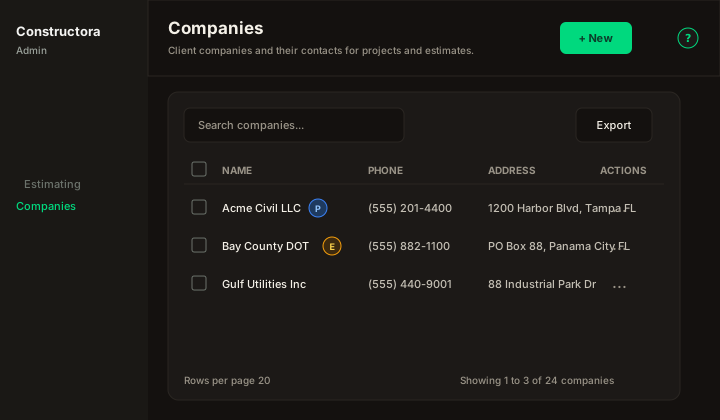
Figure: FoodHub list — New in the page header (right); data card with Search companies…, Export, checkboxes, sortable Name / Phone / Address, row ⋮, and pagination.
| Region | What you see |
|---|---|
| Page toolbar | Title Companies, subtitle Client companies and their contacts for projects and estimates., New (Add permission) on the right, and the ? icon (this article). |
| Data card | Search, Export, column headers, row checkboxes (Delete permission), bulk bar, mobile cards, pagination. |
| Wizard modal | Surface B on the list URL (?create=1 / ?edit=\{id\}) — Back / Next / Save / Cancel in the header; pills General · Contacts · Projects (Projects only when editing an existing company). |
Default sort: Name ascending (legacy description column).
List behavior
- Search — placeholder Search companies…; debounced. The API filters only when the box is empty (all rows) or the term has at least 3 characters (matches Name, Phone, Address, case-insensitive).
- Export — Copy, Excel, and CSV for the current page.
- Sort — Name, Phone, Address (mobile: Sort by combobox + direction toggle).
- Checkboxes + bulk bar — when Delete is allowed. Delete removes companies with no blocking links. Empty selection uses the shared bulk message
Select item(s) to delete. - New — page-header button (right). Opens the wizard on General only until the first successful save (then Contacts unlocks).
- Row ⋮ — Edit · Delete when permitted.
Empty state: No companies found.
Name badges
Next to the company name you may see compact badges (tooltips in the app):
| Badge | Meaning |
|---|---|
| E | From estimates — company row originated from estimate data (from_estimates). |
| P | Linked to a project — at least one project references this company. |
A company can show E, P, both, or neither.
Wizard — General
Modal titles: New Company (create) / Update Company: {name} (edit).
| Field | Rules |
|---|---|
| Name | Required. Must be unique: The company name is in use, please try entering another one. |
| Phone | Optional. US phone control (flag + national number), same as Users. |
Optional. Mail input group; placeholder company@example.com. | |
| Address | Optional. Pin input group with Google Places (US street address). Selecting a place fills the formatted address; you can still type freely. Coordinates are not stored on the company. |
| Website | Optional URL. Link input group; placeholder https://. |
Validation for missing required fields: This field is required.
Success toast (create, update, delete): The operation was successful.
ApplicationLog records Add, Update, and Delete for companies (legacy category Company).
Create flow
- Open New → fill General → Save.
- After the first save, the wizard stays open and Contacts becomes available (legacy: save company before adding contacts).
- Projects is hidden on create until the company exists and you open Edit later.
Wizard — Contacts
FoodHub nested table (same chrome as the Projects tab): Search contacts…, Export (Copy / Excel / CSV), sortable columns, mobile Sort by, persisted page size, and pagination.
Table columns: Name, Email, Phone, Role, Notes, Actions.
- New — trailing button (Add or Edit permission). Opens Surface B modal New contact / Edit contact.
- Name on the contact is required (
This field is required). - Row ⋮ — Edit · Delete (confirm Delete contact).
Empty contacts: No contacts found.
Contacts are stored in company_contact and belong to the parent company; deleting a contact does not delete the company.
Wizard — Projects (edit only)
Read-only FoodHub table of projects linked to the company (same column set as the Locations wizard Projects tab: C & G Project #, County, Name, Description, Due Date, Status, Notes). Local Search projects…, sort, export, and pagination apply to the payload returned with the company detail.
This tab does not create projects — New Project remains deferred until the Projects module is ported. Use row View (eye) when project detail routes exist.
Empty: No projects found.
Delete rules
Single delete is blocked when:
The company could not be deleted, because it is related to a projectThe company could not be deleted, because it is related to an estimate
Bulk delete:
- If none of the selected rows can be removed:
The companies could not be deleted, because they are associated with a project - Partial success:
The operation was successful. But attention, it was not possible to delete all the selected companies because they are associated with a project
Related articles
- Locations — counties/cities tied to projects.
- Estimate Note Items — reusable estimate note library (separate catalog).