Contracts (/admin/contracts) follows a contract as its own record (not a Project) from received to signed. The board has three columns — New, Working, Waiting Sign — plus History for completed contracts.
Permissions: FunctionId CONTRACT (54), menu Project Onboarding → Contracts (function.url = contract). View opens the board; Add is New; Edit saves the form and the Tasks catalog; Delete removes a contract.
Screen layout
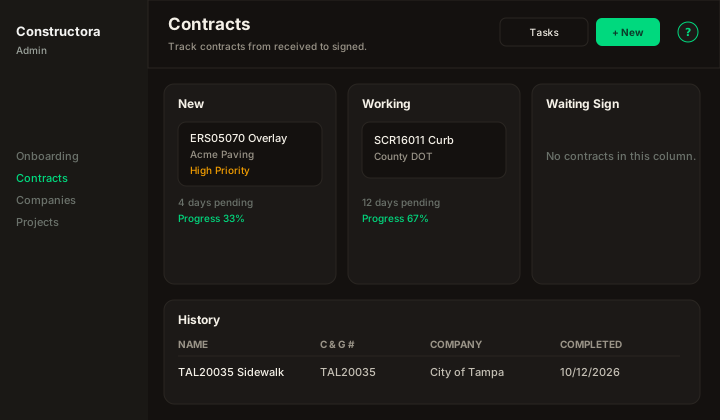
Figure: three columns New / Working / Waiting Sign, High Priority badge, days pending and task progress; History table underneath; Tasks and New in the header.
| Region | What you see |
|---|---|
| Header | Title Contracts, Tasks (Edit), New (Add), ?. New offers From Estimate or Manual. |
| Board | Cards cannot be dragged between columns — change Status in the form. High Priority, days pending (today − date received; frozen at completed date), and task Progress. |
| History | Completed rows. Columns Name, Project #, C&G #, Company, Date received, Completed. Default sort Completed descending. Search / Export / pagination. |
| Modal | Surface B (?create=1 / ?edit=\{id\}). From Estimate precarges company (awarded company if set) and pay items of the accepted quote. Several quotes → you must pick one (Select the quote that was accepted.). Contact must belong to the selected company. |
Tasks catalog
Tasks edits the shared checklist (name + comma-separated steps). Empty steps default to Sent, Received. A step already checked on a contract cannot be removed. A type already used cannot be deleted — set it Inactive. N/A tasks do not count toward progress.
Success toast: The operation was successful.