Tax Table Codes (/admin/tax-table-codes) is the HR library of tax codes such as FED and GA. The page title matches the sidebar and the legacy heading; the breadcrumb is Manage Tax Table Codes. Each row is a Code, an optional Description, and a Status.
Permissions: FunctionId TAX_TABLE_CODE (52), menu HR → Libraries → Tax Table Codes (function.url = tax_table_code). View opens the page; Add controls New; Edit and Delete control row actions and bulk delete.
Screen layout
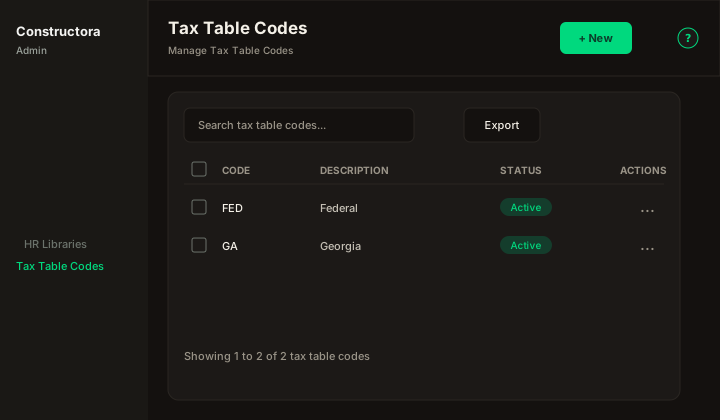
Figure: FoodHub list — New, Search tax table codes…, Export, sortable Code, Description, and Status, row ⋮, and pagination.
| Region | What you see |
|---|---|
| Page toolbar | Title Tax Table Codes, subtitle Manage Tax Table Codes, New (Add), and the ? icon (this article). |
| Data card | Search, Export, column headers, row checkboxes (Delete permission), bulk bar, mobile Sort by, pagination. There is no Filter popover. |
| Modal | Surface B on the list URL (?create=1). Cancel and Save sit in the header. |
Default sort: Code ascending.
List behavior
- Search matches Code or Description when the term is empty or at least 3 characters.
- Export covers the current page.
- Status is Active or Inactive.
Modal
- New Tax Table Code: — Code is required (placeholder GA). Description is optional (placeholder Georgia). Status starts Active.
- Update Tax Table Code:
`{code}`— same fields. - An empty code shows This field is required.
- A repeated code shows The tax table code is in use, please try entering another one.
- Save toast: The operation was successful. The API writes an ApplicationLog in category Tax Table Code.
Delete
A code linked to an employee deduction cannot be deleted. The single-row message is The tax table code could not be deleted, because it is related to an employee deduction. Bulk delete that removes nothing uses The tax table codes could not be deleted, because they are associated with an employee deduction. A partial bulk delete keeps the rows still in use and reports the legacy partial-success sentence. When a code with no deductions is deleted, related tax-table rows are removed by the database.