Invoices (/admin/invoices) is the billing list for construction periods. The grid stays empty until you apply This Month, Previous Month, Filter, or a search of three or more characters — same gate as the Symfony list (Apply a filter to view invoices).
Permissions: FunctionId INVOICE (11), menu Project Management → Invoices (function.url = invoice). View opens the list and read-only wizard. Add shows New. Edit shows ⋮ Edit, Change number, Export Excel, Export PDF, and Send email. Delete shows ⋮ Delete and bulk delete. The $ payments shortcut needs FunctionId PAYMENT (33) View.
Screen layout
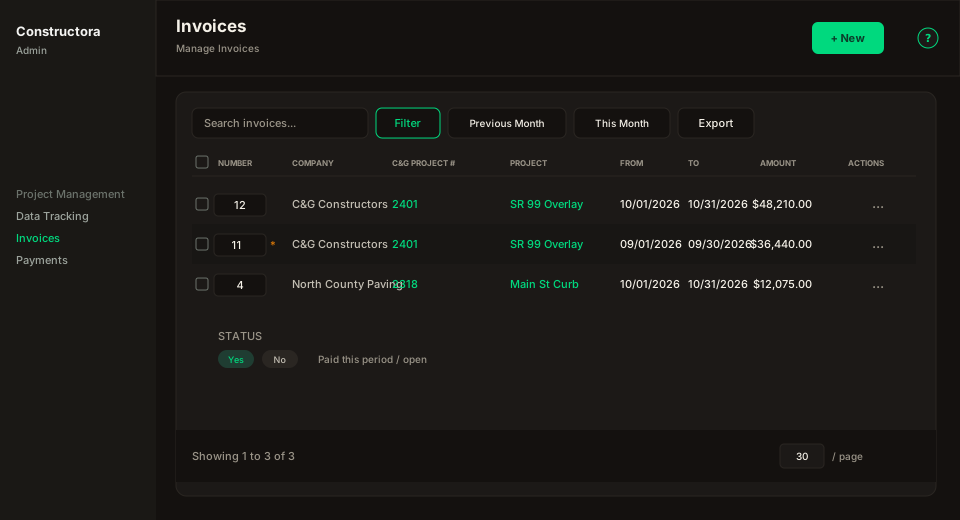
Figure: FoodHub list — title Invoices, subtitle Manage Invoices, New in the header, ? help; data card with Search invoices…, Filter, Previous Month, This Month, Export, columns Number, Company, C&G Project Number, Project, From, To, Amount, Notes, Status, Created At, row ⋮, and pagination.
| Region | What you see |
|---|---|
| Page toolbar | Title Invoices, subtitle Manage Invoices, New (Invoice Add), and the ? icon (this article). |
| Data card | Search, Filter, This Month / Previous Month, Export (Copy / Excel / CSV of the current page), sortable columns, Amount as US money, Status Yes/No (paid), override star, checkboxes (Delete), bulk bar, mobile Sort by, pagination (default 30). |
| Empty gate | Filter-search icon, then Apply a filter to view invoices until a shortcut, Filter Apply, or a 3+ character search runs. |
| Invoice wizard | Surface B on the list URL (?create=1 / ?edit= / ?view=) — pills General, Items, Attachments. |
Default sort: From descending.
List columns
| Column | Meaning |
|---|---|
| Number | Inline input (Edit) to change the invoice number on blur — same as the Symfony grid. A gold ★ means an override payment exists in this period. Hover shows last email sent when there is history. Sticky on desktop. |
| Company | Company of the project. Sortable. |
| C&G Project Number | Project number. Links to the project wizard (?edit= / ?view=). Sortable. |
| Project | Project description/name. Same project link. Sortable. |
| From / To | Invoice period (m/d/Y). Sortable. |
| Amount | Final Amount This Period (billed qty this period + QBF) × price. US format $1,234.00. Bond is not in this grid total; it is stored and shown on Excel. |
| Notes | Truncated notes. |
| Status | Yes if paid, No otherwise. |
| Created At | Created date (m/d/Y). Sortable. |
| Actions | ⋮ only (Edit, Export Excel, Export PDF, Send email, Payments, Delete). No extra $ icon beside the menu. |
Filters
This Month and Previous Month load invoices whose Created At falls in that calendar month (live JS, not the invoice period). The Filter popover can switch the date field:
- Company, Project (projects load after Company).
- Email — All / Sent / Not sent (
invoice_emailhistory). - Date field — Invoice period (start ≥ From and end ≤ To, containment) or Created At.
- From / To range.
Apply / Reset live in Filter. Reset returns to the empty gate.
Search (3+ characters): number, notes, project number/name/description, company, PO, contacts.
Row actions
| Action | Who | What |
|---|---|---|
| View | View (no Edit) | Opens the wizard read-only (?view=). |
| Edit | Edit | Opens the wizard (?edit=). |
| Export Excel | Edit | Fills the anchored invoice.xlsx template (columns A–S, footer SUM, retainage, CURRENT AMOUNT DUE) and opens the file. Legal landscape. |
| Export PDF | Edit | Converts that workbook with LibreOffice (soffice). If conversion fails, uses a previously generated PDF in uploads when present; otherwise Could not generate the invoice PDF/Excel file. |
| Send email | Edit | Compose subject/body, project contacts, attach PDF and/or Excel, history of sent mail. |
| Payments | PAYMENT View | Goes to /admin/payments?invoice_id= and opens that invoice in the Payments wizard. |
| Delete | Delete | Permanent delete if the invoice is not blocked by payments. |
New Invoice
New opens New Invoice: on /admin/invoices?create=1. From Data Tracking, New Invoice requires a toolbar project and opens the same wizard with that projectId and the next calendar month already set (day 1 through last day). The Projects wizard Invoices tab View (eye) opens ?view= — it never creates an invoice.
Create has the same three pills as edit (General / Items / Attachments). Attachments need a saved invoice; Save (stay open) keeps the wizard so you can add files.
Wizard — General
Same field placement as Symfony: Company (4) *, Project (6) *, Number (2) *. Next row: Invoice Date *, Start Date *, End Date *. Notes full width. Number is required to create or update an invoice.
Red * and inline This field is required use FormField required like the other admin wizards. Next and Save stay on General until those fields are complete (Please complete the required fields before saving. Your changes were not discarded.). Invoice Date defaults to today on New. Changing Project on create loads the next period and the pay items for that range.
Edit title: Update Invoice: Job No: {project} - Invoice #{n} | {start} - {end}.
Validation also matches the English legacy copy for overlap, duplicate number, and incorrect date.
Wizard — Items
KPI cards beside the grid (hide when ~0): Contract, Total To Date, Unpaid, This Period, Final Period, Current retainage, Bond Total Amount, Bond Qty (5 decimals). Totals follow origin math: contract from the project; Total To Date / This Period / Final Period add the signed Bond amount; retainage and Bond recalculate live when Quantity Brought Forward changes.
Grid columns (origin set, colored cells): Code, Item, Unit, Unit Price, Contract Quantity, Contract Amount, Total Quantity / Amount (blue), Unpaid Quantity / Amount (red), Quantity / Amount This Period (orange), Quantity Brought Forward (yellow, editable unless paid), Final Invoiced Quantity / Amount (green). Click a column header to sort inside each group. Code and Item stay pinned while the numeric columns scroll (origin FixedColumns start: 2). Quantity Brought Forward uses a white input with dark text so the value stays readable on the yellow cell.
- Item shows R (retainage), B (bond/bonded) badges and the
+change-order / add-on history used in Projects and Data Tracking. - Contract quantity and unit price show the same quantity/price history
+when the project item has history. - Regular pay items list first without a group bar. Change Order and Add-On are collapsible groups (chevron, item count, Expand all / Collapse all), same chrome as estimate quotes. The group bar stays pinned with Code and Item when the numeric columns scroll. Price-split child rows appear under a pay item when Data Tracking used more than one unit price in the period.
- Qty this period comes from Data Tracking billable quantity. QBF cannot exceed unpaid + current QBF (origin cap). Save needs at least one visible item.
Header Save / Save and close / Save and Export. Save and Export shows a progress overlay while the invoice is saved and the Excel is generated, then opens Save As once the file is ready.
Wizard — Attachments
FoodHub table (Search, Export, sort, pagination). Eye preview, delete, New file (name, file, note). Files live under uploads/invoice/.
Excel and PDF format
Export Excel and Export PDF show a progress overlay while the file is generated, then download once (the browser Save As if it asks where to save). They do not open a new tab.
Export does not redraw a new workbook. It fills the original product template (apps/api/assets/excel/invoice.xlsx):
- Header: invoice date and number, period, company, inspector, counties, project, notes.
- Item rows A–S, including change-order and add-on group headers and bond.
- Price splits when Data Tracking used more than one unit price in the period (and net QBF is zero).
- Footer
SUMon money columns, retainage at the effective percent (zero when billed-to-date exceeds the contract), CURRENT AMOUNT DUE. - Print area Legal, landscape, fit to one page.
PDF is that same workbook converted by LibreOffice.
Subject and body start from the project/company template. Choose contacts (or quick-add a project contact), attach PDF and/or Excel, then send. Failures that name recipients keep the English legacy wording.