Locations (/admin/locations) stores county and city rows used on projects and estimates. The list is grouped: county parents with nested city rows (not a flat one-row-per-county table).
Permissions: FunctionId COUNTY (32), menu Estimating → Libraries → Locations (function.url = county). View opens the page; Add controls New; Edit and Delete control row actions, bulk status, and bulk delete.
Screen layout
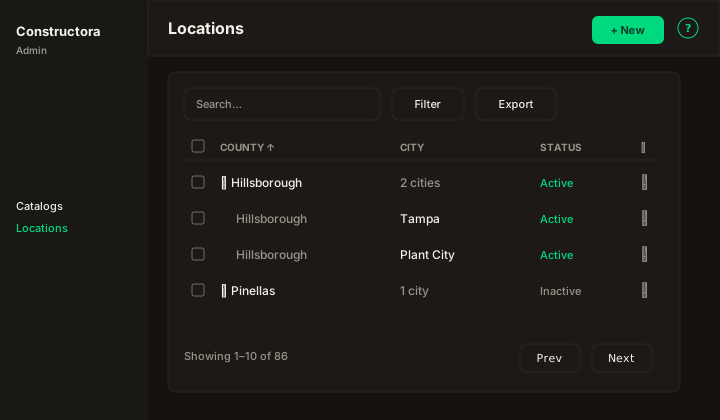
Figure: Grouped County / City / Status grid, Search, Filter (State, District, Map location), Export, New, expand/collapse on county parents.
| Region | What you see |
|---|---|
| Page toolbar | Title Locations, subtitle, New (Add), ? help. |
| Data card | Search, Filter, Export, grouped columns, checkboxes (real rows only), bulk Mark Active/Inactive and Delete, pagination by county groups. |
| New modal | New County: — single step, no wizard (County or City type, State, District, Name, Map location, Status). |
| Edit modal | Update Location: \{name\} — wizard General · Projects · Estimates (read-only linked tables). |
- County / City / Status — sortable. County parent rows expand to nested City rows (legacy grouped list).
- Filter — State, District, and Map location (All / No map location / Has map location).
- Export — Copy, Excel, and CSV of the current page.
- Checkboxes + bulk bar — Mark as Active, Mark as Inactive, Delete. Rows linked to projects or estimates cannot be removed.
- New — opens a modal (New County:) without a stepper.
- Row ⋮ — Edit (modal wizard) · Activate or Deactivate · Delete.
New location
Start with Location type (County or City), then State, District, Name (or County parent + city name), Map location, and Status. District is required. For City, the County list loads from counties in the selected District and/or State (either filter is enough).
Map location uses Google Places search (US) plus latitude/longitude and Clear. Places needs the same Maps key as Symfony (GOOGLE_MAPS_API_KEY / NEXT_PUBLIC_GOOGLE_MAPS_API_KEY in local env — never committed).
Edit wizard
Edit opens a modal on the list. Title: Update Location: {name}. Steps in the stepper only — General, Projects, Estimates — with no extra heading under the pills.
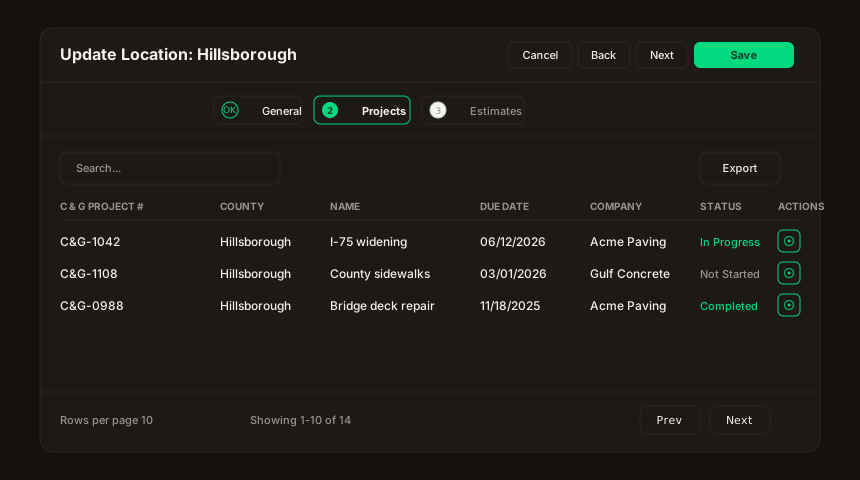
Figure: Edit Location — Projects DataTable (Search, Export, sort, pagination). Estimates uses the same chrome.
- General — same fields as New (Location type, State, District, Name, Map location, Status).
- Projects — linked projects, read-only. Columns: C & G Project #, County, Name, Description, Due Date, Company, Status, Notes, Actions. Search, Export (Copy / Excel / CSV), sortable headers, rows-per-page. Actions is a single eye button (View), not a ⋮ menu — opens the project when that screen exists.
- Estimates — linked estimates, read-only. Columns: Name, Project ID, Stage, Status, Bid deadline, Actions. Same Search / Export / sort / pagination chrome; same eye View button.