Materials (/admin/materials) stores reusable material definitions: Name, Unit of measure, and Price. Data tracking lines reference these rows when crews log material usage on site.
Permissions: FunctionId MATERIAL (15), menu Accounting AP → Libraries → Materials (function.url = materials). View opens the page; Add controls New; Edit and Delete control row actions and bulk delete.
Screen layout
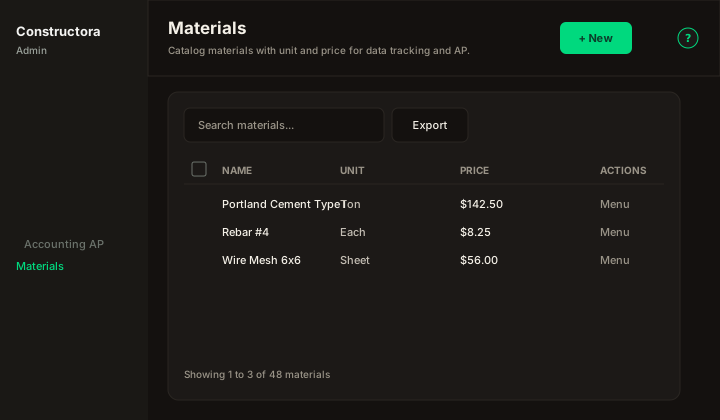
Figure: FoodHub list — New in the page header; data card with Search materials…, Export, sortable Name, Unit, and Price, row ⋮, checkboxes, and pagination.
| Region | What you see |
|---|---|
| Page toolbar | Title Materials, subtitle Catalog materials with unit and price for data tracking and AP., New (Add) on the right, and the ? icon (this article). |
| Data card | Search, Export, column headers, row checkboxes (Delete permission), bulk bar, mobile Sort by, pagination. |
| Modal | Surface B — Cancel and Save in the header; required Name, Unit (searchable combobox), and Price (US number format). |
Default sort: Name ascending.
List behavior
- Search — placeholder Search materials…; sends the API term only when empty or at least 3 characters; matches Name or Unit description (legacy).
- Export — Copy, Excel, and CSV for the current page (price formatted as money).
- Sort — Name, Unit, Price (mobile: Sort by combobox).
- Checkboxes + bulk bar — when Delete is allowed.
- New — opens New Material: modal.
- Row ⋮ — Edit · Delete when permitted.
Modal — create and edit
| Field | Rules |
|---|---|
| Name | Required. Unique across materials; duplicate → The material name is in use, please try entering another one. |
| Unit | Required. Searchable combobox of units from Units. + (Add unit) opens a nested modal to create a unit when you have Units → Add; the new unit is selected automatically (legacy btn-add-unit / ModalUnit). |
| Price | Required. Input group with leading $ + legacy US format (thousands ,, decimal .); stored as a number. |
Modal titles: New Material: (create) / Update Material: \{name\} (edit).
Success toast: The operation was successful.
Delete
Single or bulk delete removes related data tracking material rows for that catalog entry, then deletes the material. Bulk partial success uses the legacy English attention message when not every selected row could be removed.