Equations (/admin/equations) store named yield formulas (for example x*10/36) for EQUATION yield mode on Items and for project pay items on active jobs.
Permissions: FunctionId EQUATION (13), menu Estimating → Libraries → Equations (function.url = equation). View opens the page; Add/Edit/Delete control New, save, row ⋮, bulk Delete, and pay-item reassignment when delete is blocked.
Screen layout
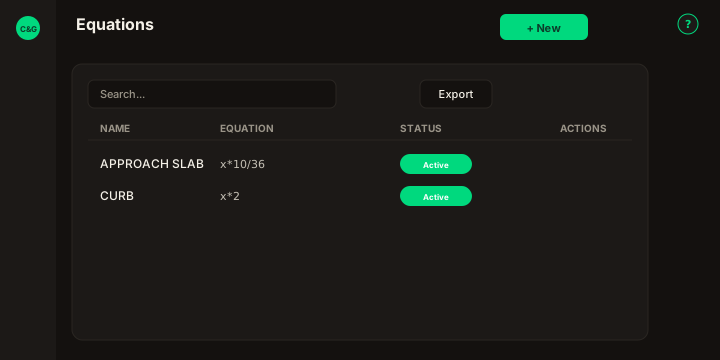
Figure: FoodHub list — Search equations…, Export, Name, Equation, Status, New, row ⋮.
| Region | What you see |
|---|---|
| Page toolbar | Title Equations, subtitle, New, ? help. |
| Data card | Search, Export, sortable columns, checkboxes, bulk Delete, pagination. |
| New modal | Name, Equation, Status — header Cancel / Save (no wizard). |
| Edit modal | Wizard General · Pay Items (read-only table of linked project pay items). |
List behavior
- Search — matches Name and Equation text (legacy DataTables scope).
- Export — Copy, Excel, and CSV for the current page.
- Sort — Name, Equation, Status (mobile: Sort by combobox).
- Checkboxes + bulk bar — Delete when your role allows Delete.
- New — modal with Name, Equation, Cancel / Save in the header (no wizard).
- Row ⋮ — Edit · Delete.
New equation
Name (unique description), Equation, and Status (Active/Inactive) are required fields on the form. The formula allows numbers, operators + - * /, spaces, parentheses, and x as the variable. Invalid input: Only numbers, operators (+ - * /), spaces, parentheses and x are allowed. Duplicate name: The equation name is in use, please try entering another one.
Edit wizard
Edit opens a modal wizard on the list. Title: Update Equation: followed by the equation name. Stepper pills — General and Pay Items — with no extra heading under the stepper.
General
Name, Equation, and Status (Active/Inactive). Save updates only these fields.
Pay Items
Read-only DataTable (Search, Export, sort, pagination — same chrome as Items → Projects): Project, Item, Unit, Yield Calculation, Quantity, Price, Total. This step does not change project data; it mirrors the legacy Pay Items tab.
Delete and reassignment
- Delete is blocked when a project item still references the equation:
The equation could not be deleted, because it is related to a item. - The app may open Pay Items to pick a replacement equation for each affected pay item, then you can delete again.
- Bulk delete uses the same rules; partial success shows the legacy English partial message when some rows remain linked.
Related
- Items — EQUATION yield mode and quick New equation from the item form.