Inspectors (/admin/inspectors) stores people who appear on data tracking entries and related project workflows. The list shows Name, Email, Phone, and Status (Active/Inactive).
Permissions: FunctionId INSPECTOR (7), menu Scheduling → Inspectors (function.url = inspectors). View opens the page; Add controls New; Edit controls the wizard; Delete controls row and bulk delete.
Screen layout
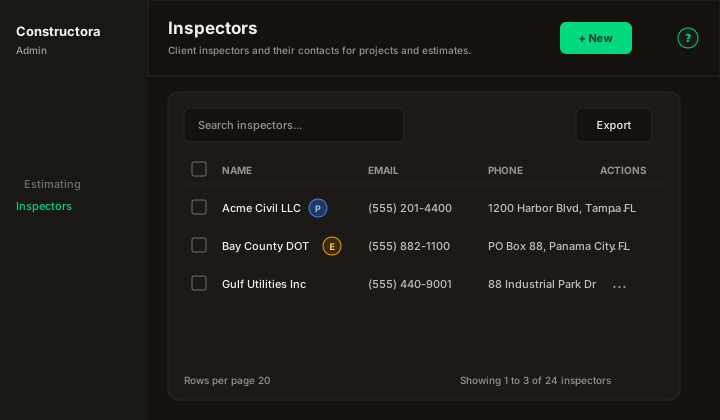
Figure: FoodHub list — New in the page header; data card with Search inspectors…, Export, sortable columns, row ⋮, checkboxes, and pagination.
| Region | What you see |
|---|---|
| Page toolbar | Title Inspectors, subtitle, New (Add) on the right, and the ? icon. |
| Data card | Search, Export, sortable Name / Email / Phone / Status, checkboxes (Delete), bulk bar, mobile cards, pagination. |
| Wizard modal | Surface B on /admin/inspectors (?create=1 / ?edit=\{id\}). New = single-step General only. Edit = stepper General · Projects (read-only project table). |
After the first successful Save on New, the app switches to edit (?edit=\{id\}) so you can open the Projects tab.
List behavior
- Search — matches inspector Name, Email, and Phone (debounced).
- Export — Copy, Excel, and CSV for the current page.
- Sort — Name, Email, Phone, Status.
- Row ⋮ — Edit · Delete when permitted.
Wizard — General
| Field | Rules |
|---|---|
| Name | Required. |
| Optional. | |
| Phone | Optional. US phone control when present. |
| Status | Active / Inactive switch. |
Modal titles follow legacy copy: New Inspector: / Update Inspector: \{name\}.
Wizard — Projects (edit only)
Read-only FoodHub table of projects where this inspector has at least one data tracking row. Same chrome as other linked tables: Search, Export, sort, pagination. Row View (eye) navigates when project detail exists.
This tab does not assign inspectors to projects — it is informational.
Delete rules
- Linked to a project (
project.inspector_id) → The inspector could not be deleted, because it is related to a project - Linked to data tracking → The inspector could not be deleted, because it is related to a data tracking
- Bulk delete may succeed partially with the legacy attention message.
Success toast: The operation was successful.