Items (/admin/items) are the company’s pay item library. Each row ties a Name to a Unit of measurement, a Yield calculation rule, and Active/Inactive status. Items flow into estimate quote lines and project items; deleting an item removes linked tracking rows the same way as the legacy Symfony app.
Permissions: FunctionId ITEM (6) — View opens the page; Add/Edit/Delete control New, save, row ⋮, and bulk delete.
Screen overview
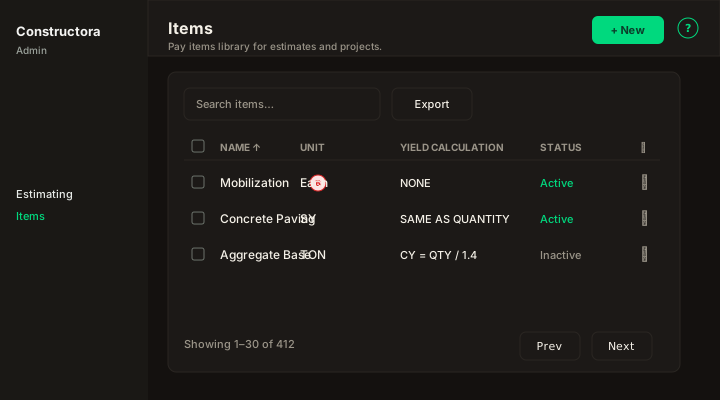
Figure: Items — default sort Name ascending; bond rows show a red B badge next to the name.
- Search — matches item name, description, and linked unit name (same scope as legacy DataTables).
- Export — Copy, Excel, and CSV for the current page of results.
- Sort — column headers Name, Unit, Yield calculation, Status (mobile: Sort by combobox).
- Checkboxes + bulk bar — Delete selected rows when your role has Delete. Partial bulk success uses the legacy English message when some rows could not be removed.
- New — modal with General only (Cancel / Save in the header).
- Row ⋮ — Edit (or View if you have View but not Edit) · Delete.
New item (General)
Open Admin → Estimating → Libraries → Items → New. Field order matches the legacy form:
- Unit — required; searchable combobox of active units from Units.
- Name — required; must be unique (
The item name is in use, please try entering another one.). - Description — optional multi-line notes (stored in
description; list search includes it). - Yield calculation — required; one of:
- NONE — no automatic yield from quantity.
- SAME AS QUANTITY — yield follows entered quantity on project/estimate lines.
- EQUATION — shows Equation combobox (active equations from the Equations catalog). The list column shows the equation text when this mode is set. With Equations → Add permission, use + next to the combobox to open New equation (name + formula) without leaving the item form; the new row is selected automatically.
- Status — Active / Inactive switch.
- Bond — only if your user has the bond operator flag (
usuario_bondin legacy). Otherwise the switch is hidden on create. Saving with bond on without permission returns:You don't have permission to mark items as bond.
Edit wizard
Edit opens a modal on the list. Title: Update item: followed by the item name. Stepper pills only — General and Projects — with no duplicate heading under the stepper.
General
Same fields as New. Changing Yield calculation or Equation on save also updates project items linked to this item (legacy ActualizarEquationItemProjects).
Projects
Read-only grid of projects that include this pay item (legacy cargarDatos → projects[]). Does not add or remove project links from here.
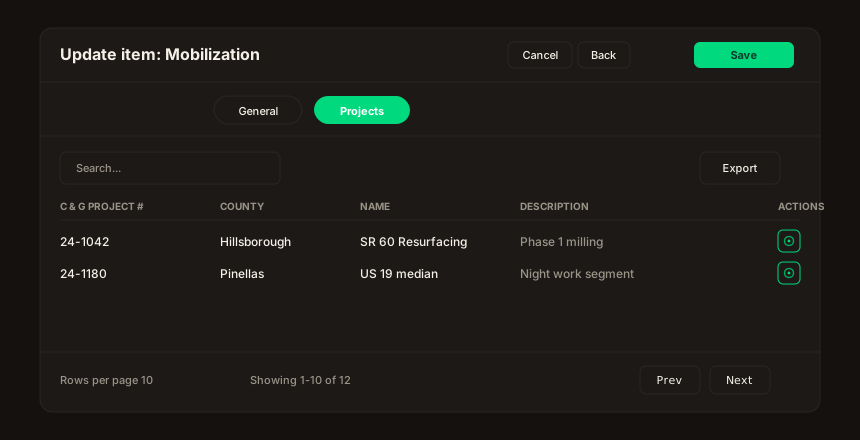
Figure: Projects — FoodHub table chrome (Search, Export, sort, pagination).
- Columns — C & G Project #, County, Name, Description (matches legacy
projects-table-editable). - Search / Export / sort / page size — client-side on the loaded payload (same pattern as Locations wizard tables).
- Actions — single View (eye) control when that is the only action; navigation to the project detail screen is wired when the Projects module exists.
Delete behavior
Single or bulk Delete runs the legacy cleanup graph (project items, data tracking lines, invoice lines, estimate quote lines, QuickBooks queue rows) before removing the item. Success toast: The operation was successful. If bulk delete removes nothing, you see: The items could not be deleted, because they are associated with a projects or invoices.
Permissions quick reference
| UI | Permission |
|---|---|
Open /admin/items | ITEM View |
| New | ITEM Add |
| Save on edit | ITEM Edit |
| ⋮ Delete / bulk Delete | ITEM Delete |
| Bond switch | Bond user flag and Add/Edit as above |