Holidays (/admin/holidays) stores non-working days the system uses in scheduling workflows. Each row is one calendar Day plus a Description label (for example THANKSGIVING or WINTER BREAK).
Permissions: FunctionId HOLIDAY (31), menu Scheduling → Holidays (function.url = holiday). View opens the page; Add controls New; Edit and Delete control row actions and bulk delete.
Screen layout
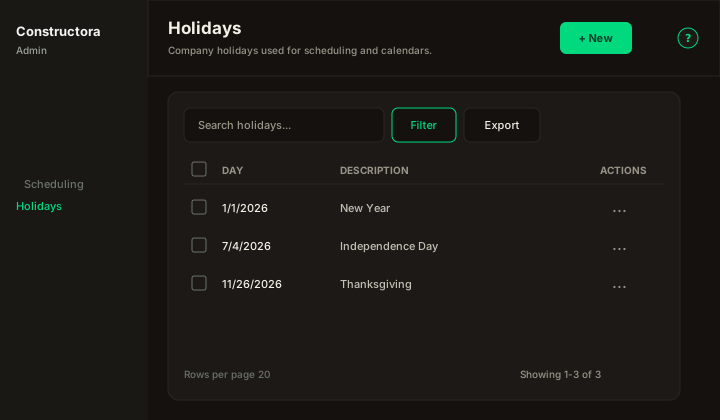
Figure: FoodHub list — New in the page header; data card with Search holidays…, Filter (date range), Export, sortable Day and Description, row ⋮, checkboxes, and pagination.
| Region | What you see |
|---|---|
| Page toolbar | Title Holidays, subtitle Company holidays used for scheduling and calendars., New (Add) on the right, and the ? icon (this article). |
| Data card | Search, Filter, Export, column headers, row checkboxes (Delete permission), bulk bar, mobile Sort by, pagination. |
| Modal | Surface B on the list URL (?create=1 / ?edit=\{id\}) — Cancel and Save in the header; required Day (date picker) and Description. |
Default sort: Day descending (most recent dates first).
List behavior
- Search — placeholder Search holidays…; matches Description only (legacy list behavior).
- Filter — popover with presets (Today, Last 7 days, Last 30 days, Custom) and From / To date pickers. Apply sends
fechaInicial/fechaFinto the API; Reset clears the range. - Export — Copy, Excel, and CSV for the current page.
- Sort — Day, Description (mobile: Sort by combobox).
- Checkboxes + bulk bar — when Delete is allowed. Empty selection uses the shared bulk message Select item(s) to delete.
- New — opens New Holiday Day: modal.
- Row ⋮ — Edit · Delete when permitted.
Dates display in US form M/D/YYYY in the grid (legacy day column).
Modal — create and edit
| Field | Rules |
|---|---|
| Day | Required. One row per calendar date; duplicate day → The holiday day is in use, please try entering another one. |
| Description | Required. Free text label shown in the list. |
Modal titles: New Holiday Day: (create) / Update Holiday Day: \{description\} (edit).
Success toast: The operation was successful.
Delete
Single and bulk delete remove holiday rows when permitted. Bulk delete with no rows removed may show the legacy message about association with a project (Symfony parity).