Final Qty Requests (/admin/final-qty-requests) is the inbox for Final Qty Approvers (the user switch finalQtyApprover, not a FunctionId). Invoice editors request a change from the invoice Items table; approvers review, approve, or reject here. Approving sets Qty This Period (billed_qty_this_period) so Final Qty = billed + QBF, writes history, and recalculates unpaid qty, bond, and retainage.
Screen layout
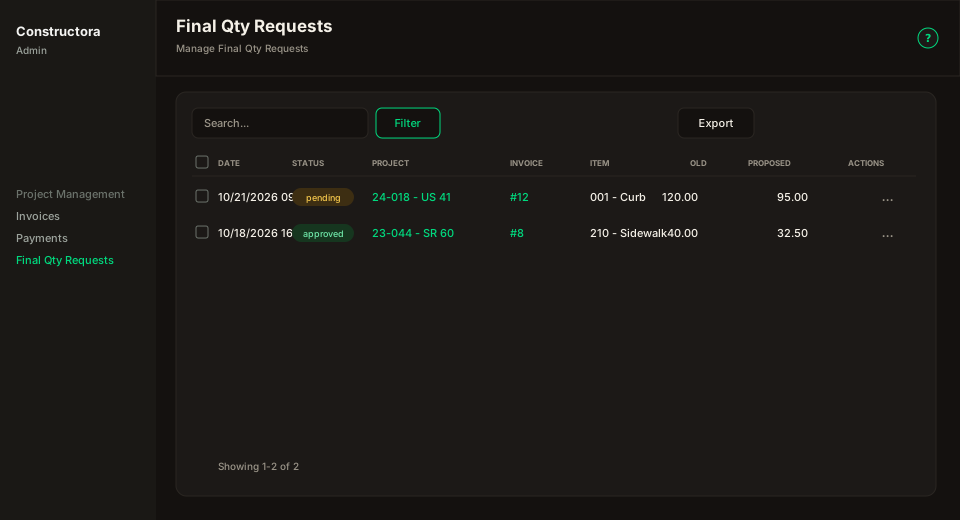
| Region | What you see |
|---|---|
| List | Search, Filter (Status, From/To), Export. Columns: Date, Status, Project, Invoice, Item, Old Final Qty, Proposed Final Qty, Requested by, Actions. Project and Invoice are links: Project opens the project (/admin/projects?edit= or ?view=), Invoice opens the invoice. |
| Default | Cancelled requests stay hidden until you filter. Sort is Date descending. Page size 30. |
| Actions | The row ⋮ menu has View and Delete (never an eye icon next to the menu). View opens the request. Pending rows show Approve and Reject. Delete asks Are you sure you want to delete this request? Bulk delete uses the same confirm for the selection. |
Email and in-app notifications deep-link with ?requestId=. The email Review request button opens /admin/final-qty-requests/approval/ plus the request token.
Invoice Items (request)
On an unpaid saved invoice, the Final Invoiced Quantity cell has a pencil (Invoice Edit). Approvers see Change Final Invoiced Quantity / Apply change (auto-approved). Everyone else sees Request Final Invoiced Quantity change / Submit request. The form needs Qty This Period and a Note. If Quantity Brought Forward is dirty, save the invoice first. A plus icon opens history when this line already has an approved change.