Projects (/admin/projects) is the inventory of construction jobs. Use search, filters, and export on the list; open New (Add permission) for the wizard modal on this page, or create from a company Projects tab.
Permissions: FunctionId PROJECT (9), menu Project Management → Projects (function.url = projects). View opens the list; Add controls New; Edit opens the wizard; Delete controls row and bulk delete.
Screen layout
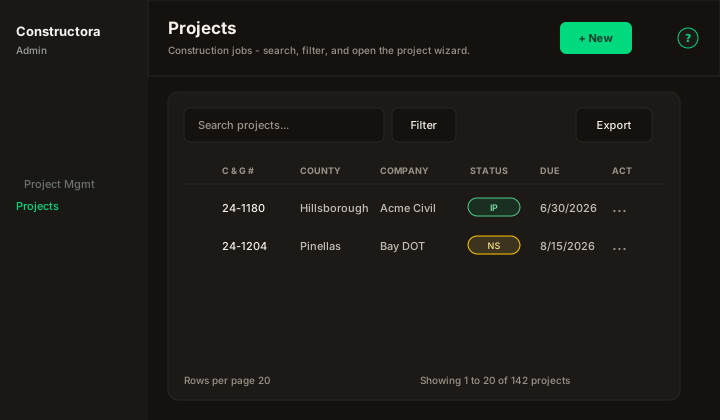
Figure: FoodHub list — New in the page header; data card with Search projects…, Filter, Export, sortable columns, row ⋮, and pagination.
| Region | What you see |
|---|---|
| Page toolbar | Title Projects, subtitle, New on the right (Add), and the ? icon. Row ⋮ includes View (read-only wizard, legacy detalle) plus Edit/Delete when permitted. |
| Data card | Search, status chips NS / IP / CO / CA (counts always unfiltered; click to add or remove statuses), Filter (Company, multi-status, date range, Missing info, Retainage, Escalator, Prevailing Wage), Export (Copy / Excel / CSV of the current page, plus Custom Excel export...), checkboxes, bulk Delete, mobile cards, pagination. Status cells use the same colored circles. |
Custom Excel export
Custom Excel export... in the Export menu opens a modal (origin Custom Excel export). C&G Project # is always included. Tick the other tabs and fields, Select all / Clear all, then Export. If rows are checked on the list, only those projects go out (one Excel row each). If none are checked, every project matching the current filters is exported, all pages. The last field set is remembered in this browser. Column headers in the workbook stay in English, matching the origin file. A full-screen overlay shows Generating Excel… then Preparing download… — the table Export button does not switch to Exporting….
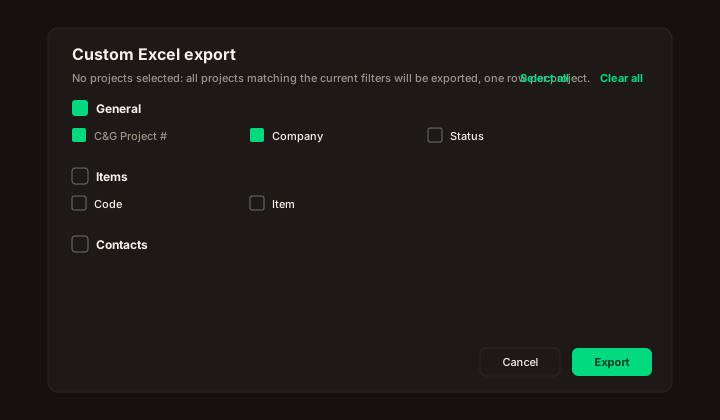
Figure: Custom Excel export — Select all / Clear all, tabs with fields, C&G Project # locked on.
| Wizard | Modal on /admin/projects (?create=1, ?edit=\{id\}, ?view=\{id\}). New shows seven pills until the project is saved; Edit and View show all 13 pills. New Project from a company stays at seven. |
Default sort: C & G Project # ascending.
Empty state: No projects found.
Wizard
After Save on General, later tabs unlock. Next and clicking a step save the project silently and then jump; Back does not save. The toast The operation was successful appears only when you press Save or Save and close. New / Edit / View stay on the list in a modal (FoodHub Surface B). New Project from a company uses the same wizard stacked on the company modal (seven pills only). Edit and View show all thirteen steps (Attachments through Log) once the job exists: a vertical rail on desktop (open with labels on wide screens, collapsed to numbers on smaller ones; a path joins the step circles; hover peeks labels when collapsed; the circular edge toggle pins it), and Step X of N plus a searchable jump control on the phone — pills never wrap onto two rows.
| Step | What you do |
|---|---|
| General | Same field positions as the legacy form (no numbered circles). Row 1: Company, Subcontract NO, Manager, Invoice Contact. Row 2: Invoice Due Date, Date Contract Received (help: the date the signed contract came in — not the Start Date), Start Date, End Date (help icon — required), Est. Gross Margin. Row 3: Project Name, Owner, Project ID #, Proposal ID #. Row 4: County, City, Inspector, Federal Funding, Certified payrolls. Row 5: C&G Project #, Project Description, Status (default In Progress), Resurfacing. Then Contract Stipulations (Add after the project is saved — pick one or more template notes, or + to create a new catalog stipulation) and Starting/Ending Location. Contract Amount appears after the project exists (from items). Duplicate C & G # is blocked. Field help uses the ? popover, not text under the input. View shows every tab read-only, including saved stipulations, items, retainage, escalator, prevailing wage, concrete vendors, contacts, attachments, completion, payment overrides, data tracking, invoices, and log. |
| Items | FoodHub nested table: Search, item/total counters in the toolbar, Export, sortable headers, pagination, mobile Sort by. Row checkboxes plus bulk Retainage / Remove Retainage / Bonded / Remove Bonded. Sticky Code + Actions. Item names show circular R (retainage), red B (catalog bond), blue B (bonded), and a plus for change-order history. Quantity and Price show a plus when that item has history; the plus opens Change Order History (same log Data Tracking, Invoices, and Payments use). New sits in the toolbar (Edit only). Add/edit modal: Existing item or New item, Code, Contract name, yield (Select empty by default), equation/unit with + quick-add, quantity, price, and Profit % side by side, Price Start Date, type button group (Regular / Change Order / Add-On), change-order date, internal note. Is Retainage? and Is Bonded? sit under their labels. Totals use US grouping (1,234.00). View keeps Search/Export/sort/pagination; no New, checkboxes, or ⋮. |
| Retainage | Shown only when the user has the Retainage flag. Yes/No switch under the label. When Yes: Retainage Percentage, Adjust Retainage to, % of Contract Completion, then Invoices and Retainage History (Total Retainage Withheld plus Invoice Date / Invoice Amt. / Inv. Ret. Amt. / Paid Amt / Actual Ret. Amt. / Actual Ret. T.D. / Ret. Reimbursed). Ret. Reimbursed is Yes when Payments saved a retainage reimbursement. Actual Ret. T.D. subtracts those amounts; a history icon opens Reimbursement History (date and amount). |
| Escalator | Same FoodHub nested table (Search, Export, sort, pagination). New Escalator modal: Day, Percent as a % input group, and optional items (empty = all items). Duplicate day is blocked. The HTTP job GET /cron-price-adjustment applies that percent to project-item prices on that day (America/New_York) and writes a system log note. |
| Prevailing Wage | Yes/No switch under the label. Certified payrolls on General unlocks the WH-347 header (We are the, WD No., business, signatory). Counties & Labor Types & Rate table (County, Labor Type, Basic $/Hr, Fringe $/Hr, Surplus). Yellow warning when Certified Payrolls is on and no rates are loaded. Add modal title County & Labor Type & Rate; Rate is a $ input group (table column stays Basic $/Hr). |
| Concrete | Nested vendor table. Concrete Vendor modal: vendor combobox with + (catalog vendor, FunctionId CONCRETE_VENDOR Add), start date, Escalator $ plus Repeat every / unit / e.g. every 6 months, and nested Concrete Classes / Prices table. GET /cron-concrete-quote-price-adjustment adds the escalator for each elapsed period and is idempotent via the last-applied marker. |
| Contacts | Nested contacts table (company contact picker, name required, duplicate blocked) plus read-only Inspectors (Data Tracking) — inspectors who appear on at least one data tracking entry (Name, Email, Phone, Status). |
| Attachments | Files stored on the job (Name, File). New opens a nested modal: Name and a dashed dropzone (Drop files here or click to upload.) required, Tags (select or create), and a formatted Note (not a plain textarea). Allowed types: png, jpg, jpeg, pdf, doc, docx, xls, xlsx. Duplicate names are blocked (The attachment has already been added). Row actions are tinted icons — Edit (pencil, Update Attachment; file optional), View (eye, in-app preview with Download and Close), Delete (trash, confirm Are you sure you want to delete the attachment?). View-only shows the eye. PDF and images open in the viewer; Word/Excel use Microsoft Office Online on public HTTPS URLs. |
| Completion | Per-item contract qty/price/total vs completed, invoiced, and paid quantities (US 1,234.00). Toolbar shows item count and contract total. Diff Qty turns red when negative. If Payments notes overrode unpaid qty, a plus opens Unpaid qty history (date, old/new unpaid, user, invoice #). Diff Qty also adds those overrides after the latest Payment Override / Master. |
| Payment Overrides | History of paid-qty overrides (Item, Previous qty, New qty, User, Date). |
| Data Tracking | Daily tracking rows (Date, Lead, concrete used, yield, difference, monetary totals). Toolbar is Search, Filter, Export, and Open Data Tracking (opens /admin/data-tracking for this job). The Filter popover has Status (All / Pending / Completed), date-range chips, and Show only PUNCH List?. Row View (blue eye) opens that day in the Data Tracking module. No create/edit in this wizard. |
| Invoices | Invoices for the job (Number with ★ when a payment override falls in the invoice dates, From, To, Amount, Notes, Paid, Created At). |
| Log | Project log notes (Date, Log, User). Toolbar is Search, Filter, and Export (+ New). The Filter popover uses the same date-range chips as Projects. Manual rows show a green circular Edit (pencil); no ⋮ and no text Edit button. System entries stay read-only. No delete. Saving a log note does not show the global success toast — that toast is only for the wizard Save button. |
Delete on the list is blocked when the job has invoices: The project could not be deleted, because it is associated with a invoice.