Payments (/admin/payments) is not a create screen. Every row is an existing invoice. You record what was paid on that period, optionally mark the invoice paid in full, and keep notes. Permissions: FunctionId PAYMENT (33). View opens the list and a read-only wizard. Edit shows Save, Mark paid, item notes, retainage reimbursement, and attachments. Open/Closed of the invoice is the Status toggle on the list, not a banner inside the wizard. Add is required to create invoice-header notes. Delete removes notes and attachments.
Screen layout
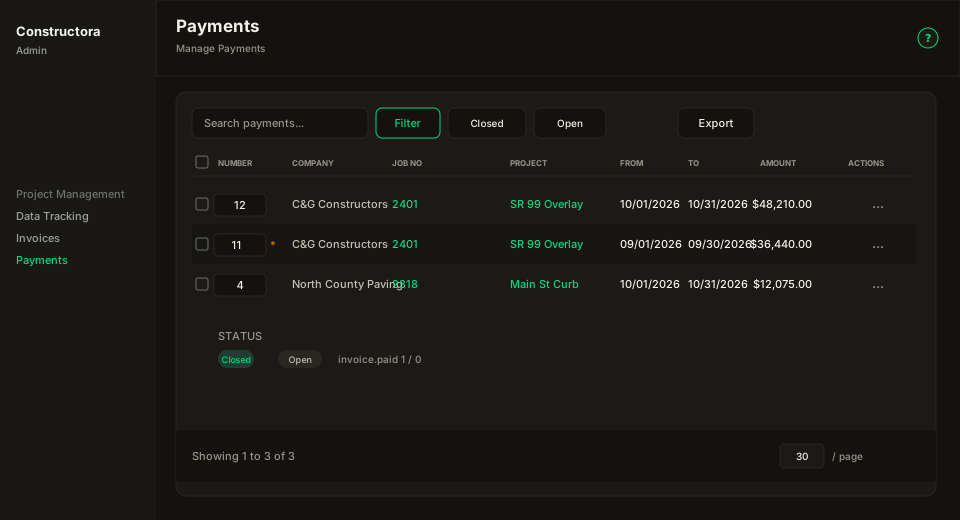
Figure: FoodHub list — title Payments, subtitle Manage Payments, ? help; data card with Search payments…, Filter, Closed, Open, Export; columns Number, Company, Job No, Project, From, To, Amount, Payment Amount, Notes, Created At, Status, Actions.
| Region | What you see |
|---|---|
| Page toolbar | Title Payments, subtitle Manage Payments, and the ? icon (this article). There is no New. |
| Data card | Search, Filter, Closed / Open, Export of the current page, sortable columns, Amount and Payment Amount as US money, Status Closed/Open, pagination (default 30). |
| Empty gate | Filter-search icon, then Apply a filter to view payments until Closed, Open, Filter Apply, or Search runs. |
| Payment wizard | Surface B on the list URL (?invoice_id= / ?view=) — pills Payments, Notes, Attachments. |
Default sort: From descending. Date filter uses the invoice period (start ≥ From and end ≤ To), not Created At.
List columns
| Column | Meaning |
|---|---|
| Number | Invoice number. Sticky on desktop. |
| Company | Company of the project. |
| Job No | Project number. Links to the project wizard when you have Project View. |
| Project | Project description/name. Same project link. |
| From / To | Invoice period (m/d/Y). |
| Amount | Final Amount This Period. US format $1,234.00. |
| Payment Amount | Sum of Paid Amt on the invoice lines. |
| Notes | Truncated invoice notes. |
| Created At | Created date (m/d/Y). |
| Status | Closed if paid, Open otherwise. Sticky next to Actions. |
| Actions | Open invoices with Edit: ⋮ (Edit, Mark paid). Paid invoices (or View only): circular View icon — a single action is never a ⋮. |
Filters
Closed and Open are toggles (paid = 1 or paid = 0). Click once to turn the filter on (filled green / red); click the same button again to turn it off. Only one can be on at a time. If you turn both off and nothing else is applied (Search / Filter), the empty gate returns. The Filter popover has Company, Project (after Company), Status, and a date range.
Invoices ⋮ Payments opens this list with ?invoice_id= so the wizard for that invoice opens immediately.
Wizard
Paid invoices open read-only for quantities (same as Symfony). Change Open/Closed on the list Status column; the wizard title already shows Job No, invoice number, and period.
| Pill | What you do |
|---|---|
| Payments | Paid Qty per line. Bond is derived (Σ Paid Amt bonded / Σ Contract Amt bonded) and is not typed. Mark paid sets every line paid and closes the invoice — it cannot be undone from the app. Retainage reimbursement is the $ on the Retainage KPI. Pay Amount (USD) records a dollar payment without changing item quantities (retainage/bond deducted, optional close). USD payment to the project allocates credit to the oldest open invoices. |
| Notes | Invoice-header notes (invoice_notes). Search, Filter (From / To), checkboxes to bulk-delete, and New opens New Note (date defaults to today, rich text). Edit and Delete are on the row menu. |
| Attachments | Same invoice files as the Invoices wizard (uploads/invoice/). |
Paid Qty and Unpaid Qty use 2 decimal places (US 1,234.00). Bond Invoiced Qty / Bond Qty use 5 decimals. Closed items show the formatted value; open items keep the input.
The note icon on Unpaid Qty opens Items Note: Override Unpaid Qty (optional), rich text, Add note, and a table of Notes / Date / Override Unpaid Qty / Actions (edit and delete). The icon turns red when the item already has notes. An override updates Unpaid Qty without changing Paid Qty. A plus icon appears when that item has unpaid-qty history.
Plus icons on the item name, Contract Qty, and Price open Change Order / quantity / price history, same as Invoices.
Unpaid qty on the grid is Invoice Qty − Paid Qty, unless a later item note overrides it. Bond uses the invoice bon_quantity.