Cancel Reasons (/admin/cancel-reasons) stores why a scheduled field day could not be worked. Each row is a Name, who was Responsible (Company, Customer, or Third party), whether it is Chargeable by default, and Status. Data Tracking uses these reasons when a measurement is marked Cancelled.
Permissions: FunctionId CANCEL_REASON (53), menu Scheduling → Cancel Reasons (function.url = cancel_reason). View opens the page; Add controls New; Edit and Delete control row actions and bulk delete.
Screen layout
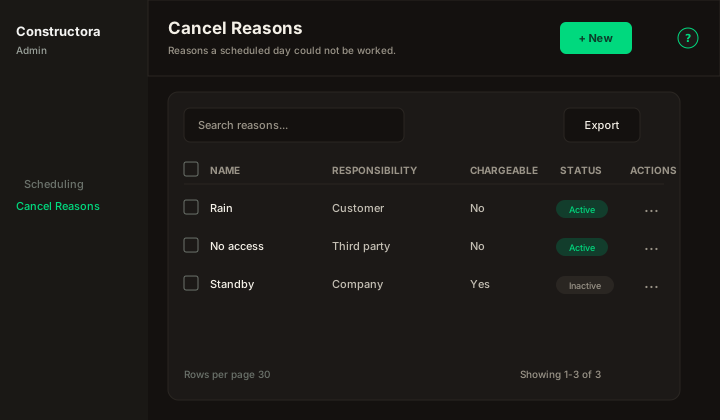
Figure: FoodHub list — New in the page header; data card with Search reasons…, Export, sortable Name, Responsibility, Chargeable, and Status, row ⋮, checkboxes, and pagination.
| Region | What you see |
|---|---|
| Page toolbar | Title Cancel Reasons, subtitle Reasons a scheduled day could not be worked., New (Add) on the right, and the ? icon (this article). |
| Data card | Search, Export, column headers, row checkboxes (Delete permission), bulk bar, mobile Sort by, pagination. |
| Modal | Surface B on the list URL (?create=1) — Cancel and Save in the header; Name, Responsibility, Chargeable by default, Status. |
Default sort: Name ascending.
List behavior
- Search — placeholder Search reasons…; matches Name (legacy list: send after 3 characters).
- Export — Copy, Excel, and CSV for the current page.
- Sort — Name, Responsibility, Chargeable, Status (mobile: Sort by combobox).
- Checkboxes + bulk bar — when Delete is allowed.
- New — opens New Cancel Reason: modal.
- Row ⋮ — Edit · Delete when permitted.
Responsibility labels: Company, Customer, Third party. Chargeable is Yes / No. Status is Active / Inactive.
Modal — create and edit
| Field | Rules |
|---|---|
| Name | Required. Duplicate name → The cancel reason name is in use, please try entering another one. |
| Responsibility | Required combobox. Empty or unknown value → Select who is responsible. |
| Chargeable by default | Switch. When this reason is chosen in Data Tracking, Charge the customer comes checked (it can still be changed per report). |
| Status | Active / Inactive. Prefer Inactive instead of delete when the reason is already used on a data tracking. |
Modal titles: New Cancel Reason: (create) / Update Cancel Reason: \{name\} (edit).
Success toast: The operation was successful.
Delete
A reason used on a data tracking cannot be deleted: The cancel reason could not be deleted, because it is used in a data tracking. Set it Inactive instead.
Bulk delete of only in-use rows: The cancel reasons could not be deleted, because they are used in a data tracking. Set them Inactive instead. Partial bulk: The operation was successful. But attention, it was not possible to delete all the selected reasons because they are used in a data tracking.