Estimate Note Items (/admin/estimate-notes) is the company library of reusable note text for estimates. Operators maintain two related catalogs on one screen:
- Notes — individual lines stored in
estimate_note_item, each with a Type of Item or Template. - Note groups — named bundles of Template notes (
estimate_note_item_group+ links) used when estimators pick a library group on an estimate.
The same Description field holds the note body in both types. Item notes behave like standalone reusable lines; Template notes can also be grouped for quick insertion as a set. Full estimate editing (attaching notes to a bid) lives in the Estimates module; this screen only maintains the catalog.
Permissions: FunctionId ESTIMATE_NOTE_ITEM (38), menu Estimating → Libraries → Notes (function.url = note_estimate_item). View opens the page; Add controls New / New group; Edit controls row Edit and save; Delete controls row delete and bulk Delete on the Notes view only.
Screen layout
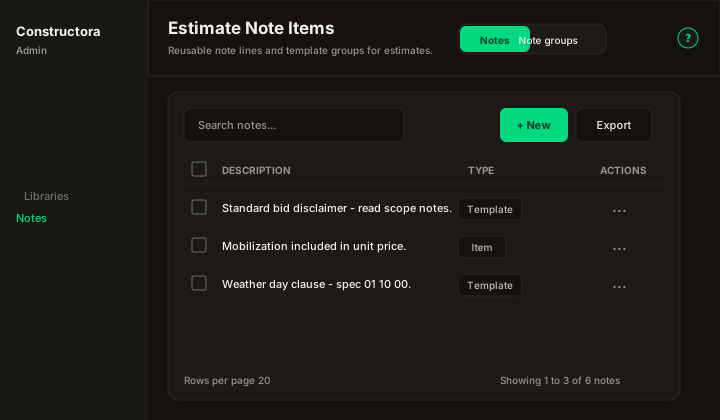
Figure: Page toolbar with Notes | Note groups toggle on the right; Notes list with Search, New, Export, checkboxes, and sortable Description / Type.
| Region | What you see |
|---|---|
| Page toolbar | Title Estimate Note Items, subtitle Reusable note lines and template groups for estimates., and the Notes | Note groups segmented control (top right). The ? icon opens this article. |
| Data card | FoodHub table chrome: Search, New or New group, Export, column headers, row ⋮, pagination, and (Notes only) row checkboxes + bulk bar. |
| Modals | Surface B dialogs — Cancel and Save in the header; no full-page form and no Metronic step numbers on labels. |
Switching Notes / Note groups reloads the grid for that view. The URL stays /admin/estimate-notes.
Notes view
Default sort: Description ascending (legacy DataTables order on description).
- Search — placeholder Search notes…; debounced (~300 ms). Sends a filter only when the box is empty (list all) or the term has at least 3 characters (matches Description, case-insensitive). Shorter typed terms do not hit the API until you reach three characters.
- Export — Copy, Excel, and CSV for the current page of results.
- Sort — Description, Type (mobile: Sort by combobox). Type displays Item or Template (stored values
item/template). - Checkboxes + bulk bar — visible when your role has Delete. Delete removes all selected notes (hard delete). If nothing is selected, the legacy message is
Select item(s) to delete. - New — opens the note modal (Add permission).
- Row ⋮ — Edit · Delete when Edit/Delete are allowed.
Empty state copy: No notes found.
New or edit note
Modal titles: New estimate note item / Edit estimate note item.
| Field | Rules |
|---|---|
| Type | Required select: Item or Template. Default on create: Item (item). |
| Description | Required multi-line text (note body). |
Validation: This field is required. Missing record on edit: The requested record does not exist.
Success toast (create, update, delete): The operation was successful.
ApplicationLog records Add, Update, and Delete for estimate note items (legacy category Estimate Note Item).
Delete notes
- Single row — confirm dialog, then permanent delete.
- Bulk — select rows, bulk bar Delete, confirm. Partial success:
The operation was successful. N of M record(s) were deleted.If none deleted:No records could be deleted.
There is no legacy FK block on note delete in this catalog; groups that referenced a deleted template note lose that link when the note row is removed.
Note groups view
Toggle Note groups in the page toolbar.
Default sort: Name ascending.
- Search — Search groups…; empty or ≥ 2 characters on Name (case-insensitive).
- Export — same Copy / Excel / CSV pattern for the current page.
- Sort — Name, Notes (member count; sort uses underlying id/count per API).
- No bulk delete — legacy groups table had no multi-select delete bar.
- New group — group modal (Add).
- Row ⋮ — Edit · Delete.
Empty state: No groups found.
New or edit group
Modal titles: New note group / Edit note group.
| Field | Rules |
|---|---|
| Group name | Required; must be unique. Duplicate: A group with this name already exists. Empty: Group name is required. |
| Template notes | Multi-select of notes where Type = Template only. Help: Only notes of type Template can be added to a group. Placeholder: Select template notes… |
Saving a group replaces all member links (estimate_note_item_group_item) with the selection you submit. API rejects non-template ids: Only template notes can belong to a library group. Unknown id: Note not found: {id} (id shown in message).
Success toast: The operation was successful. ApplicationLog category Estimate Note Item Group on Add/Update/Delete.
Delete group
Confirm, then delete the group row and its link rows. No bulk delete on this view.
Permissions quick reference
| UI | Permission |
|---|---|
Open /admin/estimate-notes | ESTIMATE_NOTE_ITEM View |
| New (notes) | Add |
| New group | Add |
| Edit / Save | Edit |
| Delete, bulk Delete (Notes) | Delete |
| Note groups toggle | View (same page) |
Without the matching flag, buttons and menu actions are hidden; the API returns 403 with Access denied.
Where notes are used later
Template and item notes from this catalog feed estimate UIs (note pickers, library groups, and line-level note fields). Keeping Template notes in Note groups speeds inserting a standard disclaimer or scope block on bids. This help article covers catalog maintenance only.