Employees (/admin/employees) is the simple employee library under HR → Libraries. The sidebar label is Employees; the legacy heading is the same and the breadcrumb is Manage Employees. This is the library (function.url = employees, FunctionId EMPLOYEE 14). The other Employees item, at the top of HR, is the HR record screen (/admin/employee-rrhh).
Each row shows a color dot, Name, Hourly Rate, and Position (the employee role description).
Screen layout
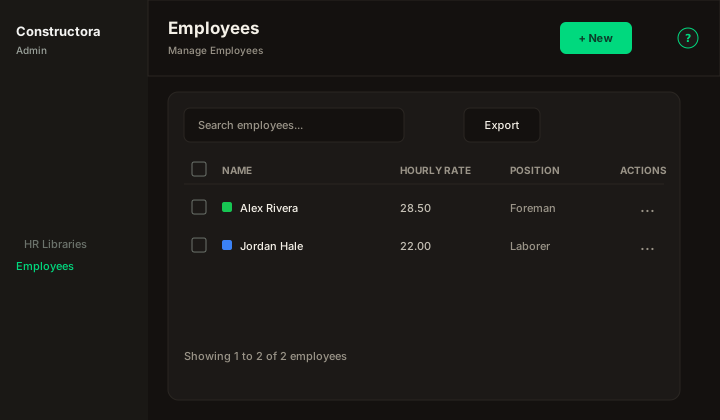
Figure: FoodHub list — New, Search employees…, Export, sortable Name, Hourly Rate, and Position, row ⋮, and pagination.
| Region | What you see |
|---|---|
| Page toolbar | Title Employees, subtitle Manage Employees, New, and the ? icon. |
| Data card | Search and Export. There is no Filter popover. |
| Modal | New employee: or Update Employee: `{name}`. Cancel and Save sit in the header. |
Default sort: Name ascending.
List behavior
- Search matches Name or Position when the term is empty or at least 3 characters.
- Export covers the current page.
- The color next to the name is the schedule color stored on the employee.
Modal
- Name and Hourly Rate are required. Empty fields show This field is required.
- Position is the active employee-role list (placeholder Select). It is optional.
- Color opens a picker. New rows start at
#17C653, the origin default. - A repeated name shows An employee with this name already exists.
- Save toast: The operation was successful. The API writes an ApplicationLog in category Employee.
Delete
Deleting an employee also removes that person's data-tracking labor rows and schedule assignments, as the origin does. If the person is still the employee on a schedule, delete stops with The employees could not be deleted, because they are associated with a project. A partial bulk delete keeps those rows and shows the legacy partial-success sentence.