Estimates (/admin/estimates) is the inventory of upcoming bids. The page opens on the calendar (legacy default). Hide Calendar switches to the FoodHub table. New and row Edit open a six-tab wizard on this same page (?create=1, ?edit=\{id\}, ?view=\{id\}).
Permissions: FunctionId ESTIMATE (29), menu Project Management → Estimates (function.url = estimate). View opens the page; Add controls New, Create Add-On, and Create Re-bid; Edit opens the wizard and change-stage; Delete controls row and bulk delete.
Screen layout
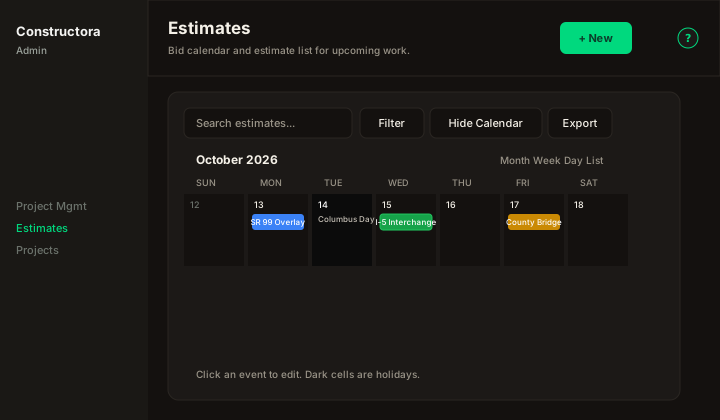
Figure: default landing — title Estimates, New, Search estimates…, Filter, Hide Calendar, Export, month grid with bid events and holiday cells.
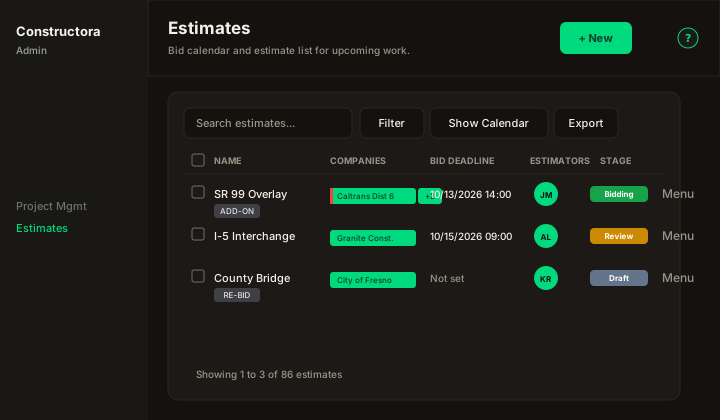
Figure: after Hide Calendar — columns Name, Companies, Bid Deadline, Estimators, Stage, row ⋮, checkboxes, pagination.
| Region | What you see |
|---|---|
| Page toolbar | Title Estimates, subtitle Bid calendar and estimate list for upcoming work., New (Add), and the ? icon (this article). |
| Data card | Search (3+ characters), Filter, Hide Calendar / Show Calendar, Export. Calendar and table share the same filters. |
| Calendar | Month / Week / Day / List. Holidays use a dark cell. Click an estimate event to edit (or view). Holiday cells do not open the form. Events with quote received show a green ring. On a phone the month is a compact grid (day number + color dots); tap a day to read the bids in the agenda below. |
| Table | Name (ADD-ON / RE-BID badge + green check when quote received), Companies (first badge truncated, red left border + +N popover), Bid Deadline (m/d/Y H:i or Not set), Estimator avatars (photo, or initials on the theme accent), Stage colored pill (click to change), ⋮ menu. |
| Wizard | Surface B modal with pills Bid Details · Bidders · Quotes · Notes · Attachments · Send quotes. Cancel / Back / Next / Save in the header. |
Default sort on the table: Name ascending. Default page size: 30.
Filters
The Filter popover matches the legacy set: Stage, Project Type, Proposal Type, Plan Status, County, District, and a bid-deadline From / To range (two selects per row; Reset / Apply stay at the bottom). Apply and Reset refresh whichever view is visible (calendar or table), not both at once. On the calendar, From also jumps the grid to that month (legacy FullCalendar initialDate). Reset (no From) returns to today.
Row actions (⋮)
FoodHub kebab menu — not the four circular Metronic buttons:
- Edit (Edit permission) or View
- Create Add-On / Create Re-bid (Add) — opens New with that row as source
- Delete (Delete)
Wizard — Bid Details
Field groups in this order (no numbered circles on labels). Creation mode (New / Add-On / Re-bid as a joined toggle group) appears only on New. Edit and View skip it and start at Proposal and schedule.
- Call Order appears only when Proposal Type is Letting.
- Project Stage options show a color dot from the stage catalog. Estimator options use the same avatar as the table: photo when the user has one, otherwise initials on the theme accent (not a different color per person).
- Add-On / Re-bid (create only) require a source estimate and a description.
- Coordinates (
location) uses Places search for a US street address. You can still type the origin hint (Type "County" after name if no city). - Next / Save on Bid Details require Name, Stage, and Project End. If Result is AWARDED, Awarded to is required.
- Quote items include Profit %. Send quotes writes
estimate_quote_emailand stamps Quotes sent. - Nested tabs use FoodHub tables (Search, Export, sort, pagination). Quote Price uses the
$input group.
Wizard — Bidders
The Bidders step lists each invited company as a stacked identity (name, contact, email, phone) plus a dashed Bid deadline box (m/d/Y H:i, tag badge, notes). If that bidder has no deadline, the box reads No bid deadline set — edit company to add. Row actions are circular Edit and Delete (not a kebab).
Add company / Update opens the origin form: Company and Contact name (both required, each with + to create), optional Bid deadline (date + hour together), Bid tag, and Bid notes / details.
Wizard — Quotes, Notes, Attachments, Send quotes
- Quotes: each quote is a collapsible group. The header shows the quote name, an item count, Edit quote and Delete quote. Expand or collapse one quote, or use Expand all / Collapse all. Items sit indented under that quote. Price is editable in the row. Add/Edit item — Quote (with
+), Existing item / New item, Code and Contract name on new items, Yield Calculation, Equation (+) when yield is Equation, Unit (+) on new items, Quantity, Price$, and multi Notes (+creates an item note). Duplicate item in the same quote is blocked. - Notes: Estimating Notes, Concrete Quote Received, then template notes. Add uses From library group (applies the pack; existing notes skipped) or Individual notes (group name + notes,
+creates a template note). Row Edit renames the group. - Attachments: Name, dashed dropzone (Drop files here or click to upload.), Tags (select or create), formatted Note, stored under
uploads/estimate/. Edit / View / Delete, bulk delete. - Send quotes: named quote packets. The Items column lists the item names; a long list ends in … and opens the full list when pressed. Row actions: Export PDF (always, FunctionId View) downloads the bid PDF (
C&G BIDplus estimate name and county) from the template (Letting vs Bids) via a progress overlay. Assign companies, edit the quote name, Save, or Save and send. Send emails the Estimating Department letter with that same PDF attached to each assigned contact.
Project Information is not shown (commented out in the origin template).